When Snowflake talks about the “Data Cloud,” they’re not just describing a database. They’re describing a vision — and increasingly, a reality — where data flows freely between organizations, across cloud providers, and across industries, without losing governance or security in the process.
If that sounds abstract, it’s because the concept is genuinely new. This post breaks it down: what the Snowflake Data Cloud actually is, how it works technically, and what it means in practice for organizations using it today.
If you’re new to Snowflake entirely, start with our foundational post: What Is Snowflake? The Complete Beginner’s Guide »
The Problem the Data Cloud Was Built to Solve
For decades, data has been trapped in silos.
A hospital has patient data in one system, claims data in another, lab results in a third. A bank has trading data, risk models, and customer records in separate platforms that were never designed to talk to each other. A retailer has point-of-sale data in one place, e-commerce data in another, and marketing data in a third.
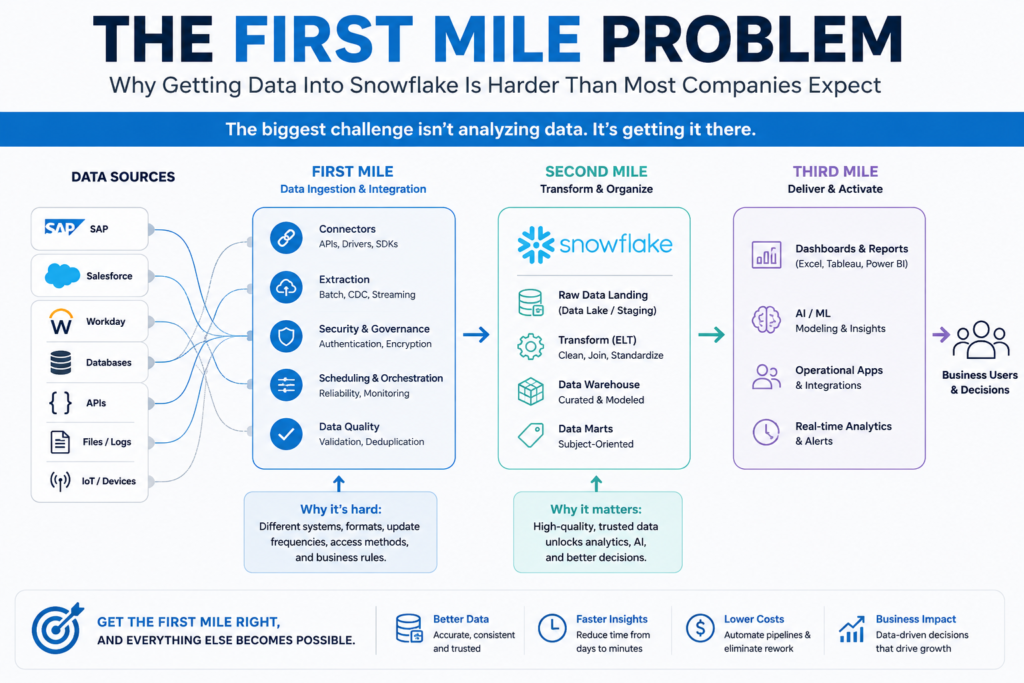
The standard solution has been to copy data from one place to another — running ETL (extract, transform, load) pipelines that move data between systems, creating multiple copies that quickly fall out of sync.
This creates three chronic problems:
-
- Data is always stale. Copying takes time. By the time data lands in the analytics platform, the source has already changed.
- Governance breaks down. When data exists in multiple copies across multiple systems, controlling who can access what becomes extremely difficult.
- Sharing with external parties is painful. Sending data to a partner, regulator, or customer typically means exporting files, setting up APIs, or building custom pipelines — all of which create security exposure and maintenance headaches.
The Snowflake Data Cloud was designed to eliminate all three problems.
What the Data Cloud Actually Is
The Data Cloud is Snowflake’s term for the connected ecosystem built on top of its platform. It has three layers:
Layer 1: The Platform
This is what most people think of when they think of Snowflake — the core cloud data platform where organizations store and analyze data. It runs on AWS, Microsoft Azure, and Google Cloud, and it separates storage from compute so each can scale independently.
The platform handles structured data (traditional rows and columns), semi-structured data (JSON, Avro, Parquet), and increasingly unstructured data (documents, images, audio metadata). It supports SQL queries, Python, Java, Scala, and Spark workloads — meaning data engineers, analysts, and data scientists can all work in the same environment.
Layer 2: The Network
This is where “Data Cloud” starts to mean something distinct from “cloud database.” Snowflake’s network connects thousands of organizations — and lets them share data with each other directly, without copying it.
The two main mechanisms are:
Secure Data Sharing: An organization can share a live, query-ready version of their data with another Snowflake customer. The recipient queries the data directly — they see the current version, not a copy that was made at some point in the past. The data never leaves the provider’s account. Access can be revoked instantly.
Data Clean Rooms: Two organizations can analyze their combined data without either party seeing the other’s raw records. This is critical for use cases like advertising measurement (where a publisher and an advertiser want to understand campaign performance without sharing their customer lists) or pharmaceutical research (where multiple institutions want to collaborate on patient data without exposing individual records).
Layer 3: The Marketplace
The Snowflake Marketplace is a data exchange where organizations can find, subscribe to, and query third-party data sets — without any ETL, without any file transfers, without any pipeline to maintain.
Data providers publish live data sets. Subscribers access them directly in their own Snowflake environment. Categories include:
-
-
- Financial market data (stock prices, bond yields, options data)
- Weather and environmental data
- Demographic and consumer data
- Healthcare reference data (drug databases, clinical terminology)
- Geospatial and location data
- Economic indicators and government data
-
For a company building a credit risk model, for example, the ability to query live economic indicator data alongside their own loan performance data — without building a pipeline to ingest it — is a significant operational advantage.
Cross-Cloud and Cross-Region Data Sharing
One of the Data Cloud’s more technically impressive features is that data sharing works across different cloud providers and different geographic regions.
An organization running Snowflake on AWS in us-east-1 can share data with a partner running Snowflake on Azure in West Europe. Snowflake handles the replication and synchronization behind the scenes. For the end user, it simply works — no infrastructure to configure, no custom networking to set up.
This matters because most large organizations have made cloud choices that don’t always align with their partners’. A healthcare system on Azure might need to share data with a pharmaceutical company on AWS. In the old world, that required significant custom engineering. In the Data Cloud, it’s a configuration.
Snowflake AI and the Data Cloud
Snowflake has been building AI capabilities — collectively branded as Snowflake Cortex — directly into the platform. This is significant because it means organizations can run AI workloads on the same platform where their data already lives, without moving data to a separate ML environment.
Cortex includes:
-
-
- Cortex Analyst: Natural language querying. Business users ask questions in plain English and get answers back from their data, without writing SQL.
- Cortex Search: Semantic search across unstructured documents stored in Snowflake.
- ML Functions: Built-in machine learning functions for forecasting, anomaly detection, and classification — available directly in SQL.
- Model training and deployment: Data scientists can train and deploy custom ML models within Snowflake’s compute environment.
-
The relevance to the Data Cloud vision: AI models are only as good as the data they’re trained on. By putting AI capabilities inside the platform where the data lives, Snowflake eliminates the latency, governance risk, and complexity of moving data to a separate AI environment.
As of late 2025, roughly 50% of Snowflake customers use AI features on a weekly basis — a sign that these capabilities have moved from experimental to operational for a large portion of the user base.
What the Data Cloud Means for Different Types of Organizations
For Data Consumers
If your organization primarily uses data for internal analytics and reporting, the Data Cloud means you have access to a rich ecosystem of third-party data through the Marketplace — without engineering work. Weather data, economic data, demographic data, and more can be added to your analytics environment in minutes.
For Data Providers
If your organization generates data that others would find valuable, the Marketplace gives you a governed, monetizable channel to distribute it. You control access, pricing, and terms. Recipients query live data — you don’t have to manage file deliveries or API infrastructure.
For Regulated Industries
Healthcare organizations can share de-identified patient data with research partners using Data Clean Rooms — maintaining HIPAA compliance while enabling the kind of multi-institution research that produces better clinical outcomes. Financial institutions can share trading data with regulators or counterparties with full audit trails and instantly revocable access.
For Multi-Organization Workflows
Retailers can share point-of-sale data with their CPG (consumer packaged goods) suppliers — giving suppliers visibility into how their products are selling without exposing the retailer’s full data set. Supply chain partners can share inventory and logistics data in real time. Insurers can collaborate with healthcare networks on claims analytics.
The Governance Layer
The thing that makes all of this possible — and trustworthy — is Snowflake’s governance architecture.
Role-Based Access Control (RBAC): Every user and every service in Snowflake operates within a defined role with specific permissions. Access to data is explicit, not assumed.
Column-Level Security: Individual columns within a table can be masked or restricted for specific roles. A customer service rep can see a customer’s name and account number but not their full payment card data — all enforced at the query level.
Dynamic Data Masking: Sensitive fields are masked in real time based on the querying user’s role. The data isn’t stored differently — the masking is applied at query time.
Row-Level Security: Policies can restrict which rows a given user sees. A regional sales analyst sees only their region’s data; the national analytics team sees everything.
Audit Logging: Every query, every access, every share is logged. For regulated industries, this is the foundation of demonstrable compliance.
Time Travel: Snowflake retains historical versions of data for up to 90 days (on Enterprise edition and above). If data is accidentally deleted or modified, it can be restored. This also enables point-in-time analysis — querying what the data looked like at any moment in the past.
Real-World Data Cloud Use Cases
Media and Advertising: A streaming platform shares viewership data with advertisers through a Data Clean Room. The advertiser can measure campaign effectiveness — did people who saw the ad subscribe? — without the streaming platform exposing individual user records.
Pharmaceuticals: A biotech company acquires clinical trial data from a research hospital via Secure Data Sharing. The hospital retains ownership; the biotech can query live updates as the trial progresses. No file transfers. No data governance gaps.
Financial Services: An asset manager subscribes to live market data from three providers via the Snowflake Marketplace. All three data sets are queryable in the same environment as their own portfolio data — enabling real-time risk calculations without a complex data ingestion pipeline.
Retail and CPG: A national grocery chain shares SKU-level sales data with its top 20 CPG suppliers. Each supplier sees only their own products’ performance. The retailer sets the governance rules; Snowflake enforces them automatically.
The Bottom Line
The Snowflake Data Cloud is the platform’s answer to a question that most data teams have struggled with for years: how do you get data to the people who need it — inside your organization and outside it — without losing control of it, without maintaining endless pipelines, and without copying the same data into six different places?
The answer is a connected, governed network where data stays in one place and access comes to the data — not the other way around.
It’s a genuinely different model from how data infrastructure has traditionally worked. And for organizations dealing with scale, multi-cloud complexity, or data-sharing requirements, it represents a significant step forward.
Continue reading: