1. AI Has a “Context Problem,” Not an Intelligence Problem
This was probably the most important line of the interview.
Ghodsi argued that modern AI models are already incredibly intelligent. The real bottleneck inside enterprises is that AI lacks access to the right business context:
Internal company data
Definitions of KPIs
Revenue logic
Product mappings
Organizational knowledge
Permissions and governance
In other words:
AI is smart. Your company’s data environment is the mess.
That’s a major reframing of the enterprise AI conversation.
2. Databricks Is Positioning Itself as the “System of Record” for AI Agents
Ghodsi repeatedly emphasized the idea that AI agents need a centralized, open data foundation.
That’s the core of the Databricks “Lakehouse” strategy:
Combine data warehousing
Combine AI infrastructure
Combine analytics
Combine governance
Put it into one architecture
He even joked about becoming the “system of record for agents.”
This is a massive strategic ambition:
Salesforce wants the workflow layer
Microsoft wants the productivity layer
OpenAI wants the model layer
Databricks wants the enterprise data/context layer
That is a very valuable position if enterprise AI scales.
3. Databricks Does Not Need an IPO Right Now
One of the most revealing business comments:
Ghodsi said Databricks burns “zero dollars.”
That matters because many AI companies are spending enormous amounts of capital and may eventually need public markets for liquidity and fundraising.
Databricks is signaling:
Strong enterprise revenue
Strong margins
Strong cash generation
Optionality
That creates leverage.
The implication:
The strongest AI infrastructure companies may stay private longer because they can.
Databricks reportedly hit a multi-billion dollar revenue run rate while reaching extremely high private valuations.
4. Enterprise AI Adoption Is Still Early
One underrated moment was Ghodsi basically saying:
CEOs are excited about AI
But most organizations still don’t actually have AI deeply embedded operationally
That’s important.
There’s a difference between:
buying ChatGPT licenses vs.
rebuilding enterprise workflows around AI
He implied the market is still in the infrastructure-building phase:
cleaning data
organizing systems
establishing governance
creating AI-ready architectures
That suggests the “AI revolution” is still much earlier than public market enthusiasm implies.
5. Databricks Is Selling “Numeracy,” Not Just Chatbots
A subtle but critical distinction: Ghodsi emphasized that enterprise AI is not just about generating text.
It’s about:
accurate analytics
accurate numbers
real-time business intelligence
operational decision-making
That’s a different category from consumer AI hype.
The Prada example illustrated this:
inventory questions
customer behavior
revenue tracking
operational intelligence
This is where enterprise AI becomes economically meaningful: not just writing emails, but improving decisions across the business.
Bigger Picture
The interview reinforced something important:
The AI race may not ultimately be won by whoever has the flashiest chatbot.
It may be won by whoever best connects:
models
enterprise data
governance
workflows
analytics
operational systems
That is exactly where Databricks is trying to position itself against competitors like Snowflake, Microsoft, and OpenAI.
For most revenue organizations, pipeline scoring is still stuck in a rep-centric mindset: activity counts, stage checklists, and optimistic forecasts that collapse late in the quarter.
At the CRO level, that approach breaks down.
What CROs actually need is not more data, but better signal—a way to understand which deals are real, which are fragile, and which are quietly distorting the forecast.
This is where custom deal scoring using Agentforce inside Salesforce becomes a powerful executive tool—when designed correctly.
Why Traditional Deal Scoring Fails CROs
Most deal scoring systems were built for:
Rep prioritization
Front-line coaching
Lead qualification
CROs, by contrast, are responsible for:
Forecast credibility
Capital allocation
Executive visibility
Board-level accuracy
The problem isn’t effort—it’s truth distortion. Deals linger too long, optimism compounds, and risk signals surface only after it’s too late.
Static scoring models can’t reason across:
Time
Behavior
Historical outcomes
Unstructured deal context
Agentforce can.
What “Agentforce Deal Scoring” Actually Means
Agentforce is not just a numeric scoring engine. It’s a reasoning layer that evaluates opportunities continuously by combining:
Structured CRM data
Activity patterns
Call and note summaries
Historical win/loss similarity
Behavioral signals from buyers and sellers
The output is not just a score—but an explanation.
Colocation is one of those old-school IT terms that still matters.
Cloud changed how businesses buy technology, but it did not eliminate the need for physical infrastructure. Servers still run somewhere. Data still lives somewhere. Networks still connect somewhere. Power, cooling, security, and uptime still matter.
Colocation, often shortened to colo, is a data center service where a business rents space for its own IT equipment inside a third-party facility.
In plain English:
Colocation lets a business put its servers, storage, and networking equipment inside a professional data center without owning the entire building.
The business usually owns or controls the hardware. The colocation provider supplies the facility, power, cooling, physical security, network access, and operational environment.
What Is Colocation?
Colocation is when a company places its own IT equipment in a third-party data center instead of keeping that equipment in an office, closet, basement, or private server room.
The company may bring:
Servers
Storage systems
Firewalls
Network switches
Backup appliances
Tape libraries
Private cloud hardware
Disaster recovery equipment
The colocation provider supplies the building and infrastructure around that equipment.
That usually includes:
Rack space
Power
Cooling
Internet and carrier access
Physical security
Fire suppression
Redundant systems
Remote hands support
Monitoring
Facility access controls
Colocation is not the same as public cloud. With cloud, a provider usually owns the underlying hardware and sells computing resources as a service. With colocation, the customer often owns or controls the hardware and rents the professional data center environment.
Colocation in Plain English
Think of colocation as renting a secure, professionally managed home for your IT equipment.
You bring the equipment.
The data center provides the space, power, cooling, connectivity, and security needed to keep it running.
It is like the difference between parking a valuable car in your driveway and parking it in a secure, climate-controlled garage with cameras, controlled access, backup power, and mechanics nearby.
For IT equipment, that environment matters.
Servers are sensitive. They need steady power, proper cooling, controlled access, network connectivity, and protection from physical risks.
That is what colocation provides.
Why Businesses Use Colocation
Businesses use colocation for several reasons.
Some want more control than public cloud gives them. Others have legacy systems that are difficult to move. Some need predictable infrastructure costs. Others want a secondary location for disaster recovery or backup.
Colocation can be useful when a business needs:
More physical security than an office server room
Better uptime than a local office environment
Control over hardware
Predictable infrastructure
Access to multiple network carriers
A place for backup or disaster recovery systems
A private cloud environment
Hybrid cloud connectivity
Compliance-friendly infrastructure
Geographic separation from the main office
Colocation is not just for huge enterprises. It can also make sense for mid-sized businesses, SaaS companies, law firms, healthcare organizations, financial firms, manufacturers, schools, local governments, and companies with specialized infrastructure needs.
What Is a Data Center Rack?
A rack is a standardized metal frame used to hold IT equipment.
Servers, storage arrays, switches, firewalls, patch panels, and other devices are mounted into racks so they can be organized, powered, cooled, and connected properly.
Most data center racks are based on a standard equipment width of 19 inches.
When a business buys colocation, it may rent:
A full rack
A half rack
A quarter rack
A single cabinet
A private cage
A custom footprint
A full rack gives more space, but it also requires more planning around power, cooling, cabling, and equipment layout.
What Is a U?
A U, or rack unit, is a standard measurement of vertical space inside a data center rack.
One U equals 1.75 inches of height.
So when equipment is described as 1U, 2U, or 4U, that tells you how much vertical rack space it takes.
Examples:
Equipment Type
Common Rack Size
Network switch
1U
Firewall
1U
Thin server
1U
Larger server
2U
Storage array
2U to 4U or more
Tape library
Varies widely
A standard full-height rack is often 42U, although some data centers use taller racks.
That does not mean a business can automatically install 42 separate pieces of equipment. Some equipment takes more than 1U. Some space may be needed for cabling, airflow, patch panels, or future expansion.
Simple Rack Space Example
Imagine a business rents part of a rack and wants to install:
Equipment
Rack Space
Firewall
1U
Network switch
1U
Server 1
2U
Server 2
2U
Backup appliance
2U
Storage array
4U
Patch panel
1U
That setup already uses 13U before accounting for cable management, airflow needs, or future growth.
This is why rack planning matters.
A business should not only ask, “How many servers do we have?”
It should also ask:
How much physical space, power, cooling, cabling, and growth capacity will this environment require?
Colocation Is Not Just About Space
One of the biggest mistakes beginners make is thinking colocation is only about renting rack space.
Rack space matters, but it is only one part of the decision.
A business also needs to understand:
Power
Cooling
Connectivity
Redundancy
Security
Access
Support
Contract terms
Compliance needs
Expansion options
The rack is the visible part.
The real value is the facility around it.
Power: The Most Important Thing Beginners Miss
In colocation, power can matter as much as space.
A business might physically fit equipment into a rack, but that does not mean the rack has enough power to run everything safely.
Colocation power may be priced or described by:
Amps
Kilowatts
Circuits
A-side and B-side power
Metered power
Committed power
Redundant power feeds
For example, a customer may rent a rack with a specific power allocation. If the equipment needs more power than the rack provides, the business may need a different design, a different contract, or more expensive infrastructure.
In plain English:
You do not just rent space in a data center. You rent power.
That matters because modern equipment can be power-hungry. Storage systems, dense virtualization environments, and GPU servers can consume significant power and create significant heat.
A-Side and B-Side Power
Many data center environments use redundant power paths.
You may hear people talk about A-side power and B-side power.
This usually means equipment can be connected to two separate power feeds. If one side has a problem, the other side may continue supplying power.
This requires compatible equipment, proper cabling, and thoughtful design.
Not every device has dual power supplies. Not every customer needs the same level of redundancy. But for mission-critical systems, redundant power can be an important part of the colocation decision.
If that heat is not managed properly, equipment can fail.
Data centers are designed to remove heat using cooling systems, airflow management, hot aisle and cold aisle layouts, containment, and other facility design practices.
Power and cooling are connected.
The more power equipment uses, the more heat it typically produces.
This is especially important for:
Dense server environments
Virtualization clusters
Storage-heavy workloads
Private cloud environments
AI and GPU infrastructure
Backup and archive systems
A business should not only ask whether equipment fits in the rack.
It should ask whether the data center can power and cool that equipment reliably.
Connectivity: How Your Equipment Connects to the World
Colocation also provides access to network connectivity.
This may include:
Internet access
Private network circuits
Cloud connectivity
Telecom carriers
Fiber connections
Cross-connects
Interconnection with partners or vendors
Some colocation facilities are carrier-neutral, which means multiple network providers operate in the building. That gives customers more choice and flexibility.
Carrier-neutral facilities can be valuable because the business is not locked into only one connectivity provider.
What Is a Cross-Connect?
A cross-connect is a physical connection between your equipment and another network, carrier, cloud provider, or customer inside the data center.
In plain English:
A cross-connect is how your rack connects to something else inside the facility.
Cross-connects can be used for:
Internet service
Private circuits
Cloud on-ramps
Low-latency connectivity
Disaster recovery replication
Hybrid cloud networking
Connecting to partners or service providers
Cross-connect costs matter. Some facilities charge setup fees and monthly recurring fees for cross-connects.
A low-cost rack can become more expensive if connectivity fees are high.
Colocation vs. Cloud
Colocation and cloud are related, but they are not the same.
With cloud, a business rents computing resources from a cloud provider. The provider owns and manages the underlying infrastructure.
With colocation, a business usually owns or controls its own hardware and rents the data center environment where that hardware lives.
Category
Colocation
Cloud
Hardware ownership
Customer often owns hardware
Provider owns hardware
Control
More hardware-level control
Less physical control
Scaling
Requires hardware planning
Easier to scale quickly
Pricing
Space, power, bandwidth, services
Usage-based or subscription
Best for
Stable, controlled, specialized workloads
Flexible and elastic workloads
Responsibility
More customer responsibility
More provider abstraction
The right answer is not always colocation or cloud.
For many businesses, the answer is both.
That is called a hybrid infrastructure strategy.
Colocation and Hybrid Cloud
Colocation can play an important role in hybrid cloud.
A business might use:
Public cloud for applications
Colocation for core infrastructure
SaaS for business tools
Cloud backup for fast recovery
Tape or offline storage for long-term resilience
Colocation for disaster recovery systems
This is why colocation is still relevant.
The cloud did not eliminate the data center. It changed how businesses think about where systems should live.
Some workloads belong in cloud.
Some belong in colocation.
Some belong in SaaS.
Some may still run on-premises.
The real question is not “cloud or colo?”
The better question is:
Where should each system live based on cost, control, performance, risk, and recovery needs?
Colocation and Disaster Recovery
Colocation can be useful for disaster recovery because it creates geographic and operational separation.
If a company keeps all systems in one office, it has a concentration risk. A fire, flood, power event, theft, ransomware attack, or local outage could create serious disruption.
A colocation facility can serve as:
A secondary data center
A disaster recovery site
A backup replication target
A private recovery environment
A location for redundant infrastructure
A place to host critical systems away from headquarters
This connects directly to business continuity.
If the main office is unavailable, the business may still have infrastructure running elsewhere.
Colocation and Backup Strategy
Colocation can also support backup and recovery planning.
A business may use colocation for:
Backup servers
Storage arrays
Replication targets
Tape libraries
Immutable backup appliances
Disaster recovery infrastructure
Archive systems
This matters because backup is not the goal.
Recovery is the goal.
A business needs to know not only whether data is backed up, but also where it is stored, how it is protected, how quickly it can be restored, and whether the recovery environment is ready.
Colocation can be one piece of that strategy.
Colocation and Offsite Infrastructure
Colocation is also part of a broader offsite infrastructure conversation.
Businesses often need to separate critical systems and recovery copies from the main operating location.
That can include:
Offsite tape vaulting
Cloud backup
Disaster recovery as a service
Colocation
Secondary data centers
Immutable storage
Air-gapped backup copies
The goal is not to chase technology for its own sake.
The goal is survivability.
If something bad happens, can the business keep operating or recover quickly enough?
Who Should Consider Colocation?
Colocation may make sense for businesses that need more control than cloud but more resilience than an office server room.
Examples include:
Law firms with sensitive client data
Healthcare organizations with compliance requirements
Financial services firms
SaaS companies
Manufacturers
Local governments
School systems
Media companies
Insurance companies
Companies with legacy applications
Businesses with private cloud environments
Organizations with predictable infrastructure needs
Companies that need a disaster recovery site
Colocation is especially relevant when a business has equipment it wants to control but does not want to house in a weak physical environment.
When Colocation May Not Make Sense
Colocation is not right for every business.
It may not make sense if:
The business has no need to own hardware
Cloud services already meet the business need
The company lacks IT staff or vendor support
The workload changes constantly
The business cannot manage hardware lifecycle planning
The equipment footprint is too small to justify complexity
The company needs simple SaaS tools, not infrastructure
Colocation gives control, but control comes with responsibility.
The business still needs to manage or support the hardware, operating systems, applications, backup design, patching, monitoring, and vendor relationships.
Questions to Ask Before Buying Colocation
Before signing a colocation agreement, a business should ask:
How much rack space do we need?
How much power do we need?
Is power redundant?
How is cooling handled?
What network carriers are available?
Is the facility carrier-neutral?
What are the cross-connect fees?
What remote hands services are available?
What physical security controls are in place?
What compliance certifications does the facility have?
Can we visit the facility?
What happens if we need more power later?
What happens if we need more space later?
What is included in the monthly cost?
What costs extra?
What is the contract term?
What service levels are offered?
How are outages communicated?
Who can access our equipment?
How are visitors authenticated?
What happens when we need to remove equipment?
These questions matter because colocation is not just a technical decision.
It is a business risk decision.
Beginner Colocation Terms to Know
Term
Meaning
Colocation
Renting data center space for your own IT equipment
Rack
A frame or cabinet that holds IT equipment
U / Rack Unit
A standard unit of vertical rack space equal to 1.75 inches
Full Rack
A full cabinet, often around 42U
Half Rack
A smaller portion of rack space
Cage
A physically separated private area inside a data center
Cross-Connect
A connection between your equipment and another carrier or network
Carrier-Neutral
A facility with access to multiple network providers
Remote Hands
Data center staff performing basic tasks on your equipment
A/B Power
Redundant power feeds for critical equipment
SLA
Service Level Agreement describing performance or uptime commitments
The Business Case for Colocation
The business case for colocation usually comes down to five things:
1. Control
The business can own and configure its own hardware.
2. Resilience
The equipment sits in a professional data center instead of a vulnerable office environment.
3. Connectivity
The business can access carriers, private circuits, and cloud connections.
4. Security
The facility provides controlled physical access, cameras, monitoring, and professional security procedures.
5. Recovery
Colocation can support backup, disaster recovery, and business continuity planning.
That does not mean every business needs colocation.
But for the right use case, it can be a powerful infrastructure option.
Bottom Line
Colocation is not just renting space for servers.
It is renting access to a professional data center environment.
Racks and U’s are the starting point, but the real decision involves power, cooling, connectivity, security, redundancy, cost, and recovery planning.
For businesses that need control over infrastructure, colocation remains relevant.
The cloud changed IT, but it did not eliminate physical infrastructure.
Sometimes the smartest move is not putting everything in the cloud.
Sometimes the smartest move is putting the right systems in the right facility, with the right power, cooling, connectivity, security, and recovery plan.
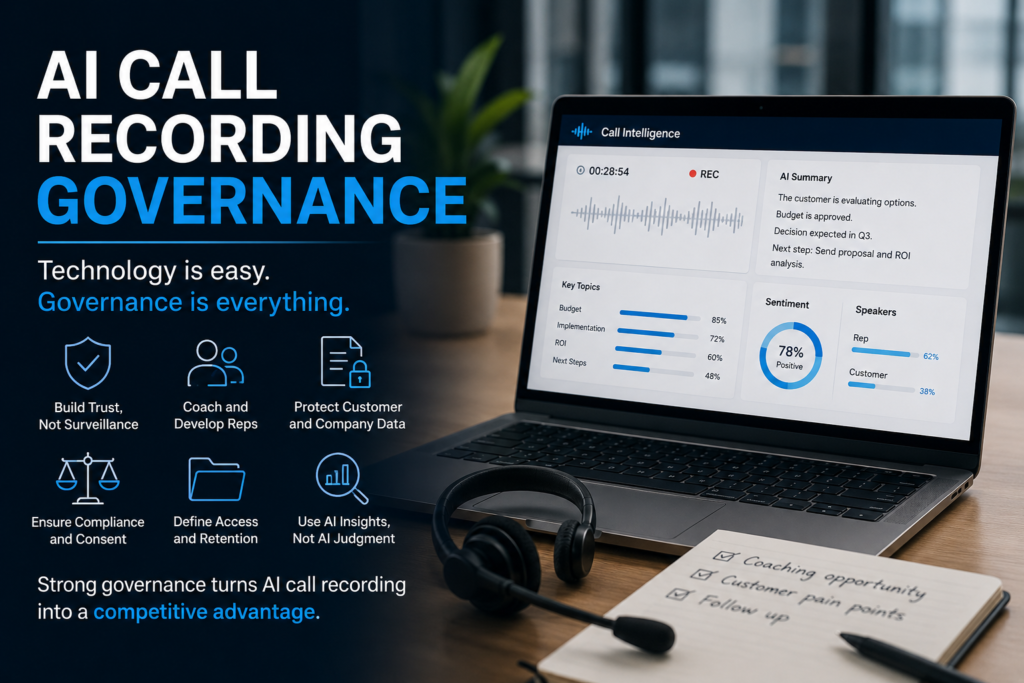
AI call recording software is becoming standard infrastructure inside many sales organizations. Platforms can now record meetings, summarize conversations, identify objections, track competitor mentions, and feed CRM systems automatically.
The pitch is compelling. Better coaching. Faster onboarding. More forecast visibility. Stronger documentation.
And to be fair, many of those benefits are real.
But most companies are approaching AI call recording the wrong way. They focus heavily on the software itself while barely thinking about governance, operating models, or leadership discipline.
That is where problems begin.
The real challenge is not whether the technology works. The real challenge is whether the organization knows how to use it responsibly and intelligently.
Governance Matters More Than the Software
Most vendors sell AI call recording as a productivity tool. They showcase dashboards, summaries, sentiment analysis, and coaching insights. But technology alone does not create operational maturity.
In fact, poorly governed systems often create confusion instead of clarity.
Many leaders quietly start treating AI-generated summaries as objective truth. That is dangerous. AI can identify patterns and structure, but it cannot fully understand context, emotional nuance, customer politics, hesitation, or strategic tension inside a conversation.
A transcript may technically capture the words correctly while completely missing the meaning behind them.
Strong sales leaders understand that AI outputs are artifacts, not judgment. The software can support decision-making, but it cannot replace leadership interpretation.
The Surveillance Problem
One of the fastest ways to damage adoption is to create a culture where reps feel constantly monitored.
If salespeople believe every word is permanently scored, analyzed, and evaluated, conversations become less natural. Reps may become overly cautious, less exploratory, and more performative during customer interactions.
That weakens the very thing sales organizations are supposedly trying to improve.
The strongest organizations position AI call recording as coaching infrastructure, not surveillance infrastructure. There is a massive cultural difference between those two approaches.
When trust exists, recordings become useful learning tools. Without trust, the platform becomes another layer of organizational anxiety.
Where Governance Actually Matters
Governance sounds abstract until companies run into real operational problems.
Recorded calls often contain sensitive information involving pricing, contracts, customer strategy, legal concerns, security conversations, and financial discussions. Without clear rules around retention, permissions, and access, organizations can unintentionally create major governance exposure.
Companies also struggle when they fail to define the purpose of the system upfront.
Is the goal coaching? Forecasting? Documentation? Compliance? Onboarding? Most organizations say “all of the above,” which usually leads to vague adoption and inconsistent usage.
Clear operating models matter more than feature lists.
Organizations should know:
why calls are recorded
who can access them
how long recordings are retained
how managers are expected to use the information
when human review overrides AI-generated outputs
Those questions are operational questions, not technical ones.
Human Judgment Still Matters
There is a growing temptation in modern sales organizations to automate judgment itself.
That is a mistake.
AI can absolutely help surface patterns across hundreds of conversations. It can help managers review more calls, onboard new hires faster, and improve documentation quality.
But leadership still requires interpretation.
Good sales management involves reading between the lines, understanding organizational dynamics, recognizing customer hesitation, and applying contextual judgment. AI cannot fully replicate that.
The companies getting the most value from AI call recording are usually the companies that already have:
strong management discipline
healthy sales culture
operational clarity
mature processes
trust inside the organization
The software amplifies strengths that already exist.
It also amplifies dysfunction.
Final Thoughts
The wrong question is: “Should we buy AI call recording software?”
The better question is: “What operating model do we need in order to use AI call recording responsibly and effectively?”
That distinction matters.
Because ultimately, this category is not really about recording calls. It is about operational maturity, leadership discipline, governance, and trust.