Author: Admin

  • LTO-8 vs. LTO-9 vs. LTO-10: What Businesses Should Know

    LTO tape is not dead. For many businesses, it is still one of the most practical ways to store large amounts of data offline, retain long-term archives, and create a recovery layer that is not constantly exposed to the network.

    That matters because modern backup strategy is no longer just about convenience. It is about recoverability, ransomware resilience, compliance, and cost control.

    If your business is looking at tape backup, tape archiving, or offsite vaulting, the three generations you are most likely to compare are LTO-8, LTO-9, and LTO-10.

    What Is LTO Tape?

    LTO stands for Linear Tape-Open. It is an open tape storage format used by businesses, data centers, media companies, government agencies, healthcare organizations, financial institutions, and other organizations that need reliable long-term data storage.

    LTO tape is commonly used for:

    • Backup
    • Archive
    • Disaster recovery
    • Ransomware recovery
    • Long-term records retention
    • Media and video storage
    • Scientific and research data
    • Legal and compliance archives

    The main appeal is simple: LTO tape can store a lot of data at a relatively low long-term cost, and it can be physically separated from production systems.

    That physical separation is one of tape’s biggest advantages.

    LTO-8 vs. LTO-9 vs. LTO-10 Comparison

    GenerationNative CapacityCompressed CapacityNative Transfer RateBest Fit
    LTO-812 TB30 TBUp to 360 MB/s range, depending on driveCost-conscious backup and archive
    LTO-918 TB45 TBUp to 400 MB/sLarger archives and newer backup environments
    LTO-1030 TB or 40 TB75 TB or 100 TBUp to 400 MB/s nativeEnterprise-scale archive, AI-era data, long-term growth

    LTO-10 now supports both 30 TB native / 75 TB compressed and 40 TB native / 100 TB compressed cartridges, depending on the media type. The LTO Program says LTO-10 drives support up to 40 TB native and 100 TB compressed capacity, assuming 2.5:1 compression.

    LTO-8: Still Useful, But Aging

    LTO-8 is often the entry point for businesses that want serious tape capacity without jumping all the way to the newest generation.

    An LTO-8 cartridge holds:

    • 12 TB native
    • 30 TB compressed, assuming 2.5:1 compression

    LTO-8 can still make sense if a business is buying used or refurbished equipment, already owns LTO-8 infrastructure, or has moderate archive needs. HPE describes LTO-8 as supporting up to 30 TB compressed per cartridge, with features such as LTFS and AES 256-bit hardware encryption.

    The downside is that LTO-8 is no longer the newest generation. If a business is starting from scratch and expects data growth, LTO-9 or LTO-10 may be more future-friendly.

    Best for:

    • Smaller businesses with large but manageable backup sets
    • Organizations buying lower-cost refurbished hardware
    • Long-term archives that do not require the latest generation
    • Businesses that already own LTO-8 drives or libraries

    Watch out for:

    • Older hardware
    • Limited future scalability
    • Compatibility planning
    • Used-drive reliability
    • Vendor support availability

    LTO-9: The Middle Ground

    LTO-9 increased capacity over LTO-8 and became a strong middle option for businesses that need more room but do not necessarily need the newest LTO-10 environment.

    An LTO-9 cartridge holds:

    • 18 TB native
    • 45 TB compressed

    Fujifilm notes that LTO-9 increased native cartridge capacity by 50% over LTO-8 and supports up to 400 MB/sec drive throughput, or about 1.44 TB/hour in ideal conditions.

    For many businesses, LTO-9 may be the practical sweet spot: newer than LTO-8, more affordable than LTO-10, and large enough for serious backup and archive use cases.

    Best for:

    • Mid-sized businesses
    • Enterprises refreshing older tape systems
    • Backup and archive environments with steady growth
    • Companies that want newer media without adopting LTO-10 yet
    • Offsite vaulting programs that need higher cartridge density

    Watch out for:

    • Higher cost than LTO-8
    • Hardware availability
    • Compatibility with existing backup software
    • Whether the business should skip directly to LTO-10

    LTO-10: The Newer Enterprise Option

    LTO-10 is the newest and largest option in this comparison. It is designed for businesses dealing with very large data sets, long-term retention, cyber resilience, and large-scale archive needs.

    LTO-10 cartridges support:

    • 30 TB native / 75 TB compressed
    • 40 TB native / 100 TB compressed

    The 40 TB LTO-10 cartridge specification was announced in November 2025, adding an extra 10 TB of native capacity beyond the earlier 30 TB LTO-10 cartridge.

    This makes LTO-10 especially relevant for:

    • AI data archives
    • Media libraries
    • Research data
    • Healthcare imaging
    • Financial services records
    • Government archives
    • Enterprise ransomware recovery strategies

    Quantum describes LTO-10 as supporting up to 40 TB native and 100 TB compressed capacity, with full-height drive performance up to 400 MB/sec native and up to 1,000 MB/sec compressed.

    Best for:

    • Large enterprises
    • Data-heavy businesses
    • New tape infrastructure projects
    • Long-term archive modernization
    • Organizations trying to reduce cartridge count
    • Businesses with petabyte-scale storage needs

    Watch out for:

    • Higher upfront hardware cost
    • Compatibility limits
    • Drive and library availability
    • Whether your backup software fully supports the environment
    • Whether your business actually needs this much capacity

    Compatibility Matters

    This is one of the most important details.

    Older LTO generations often had more backward compatibility. But LTO-10 is different.

    The LTO Program says LTO-10 drives can only read and write LTO-10 media, though they support both 30 TB and 40 TB LTO-10 media interchangeably.

    That means a business should not casually assume it can buy an LTO-10 drive and read older LTO-8 or LTO-9 tapes.

    This matters if you already have old tape archives. If your business has boxes of LTO-7, LTO-8, or LTO-9 tapes, you need to plan carefully before replacing drives.

    Plain-English Recommendation

    If you are starting from scratch:

    Choose LTO-8 if budget is the top concern and your data needs are moderate.

    Choose LTO-9 if you want a practical balance of capacity, maturity, and cost.

    Choose LTO-10 if you are building for large-scale long-term archive, enterprise retention, AI-era data growth, or a serious cyber-resilience strategy.

    For many businesses, LTO-9 is the practical middle, while LTO-10 is the strategic enterprise choice.

    Why Businesses Still Use Tape

    Businesses still use tape because it solves a problem cloud storage does not automatically solve: offline recoverability.

    Cloud backup is useful, but cloud-connected systems can still be affected by:

    • Misconfiguration
    • Credential compromise
    • Ransomware
    • Accidental deletion
    • Retention policy mistakes
    • Vendor or account access problems

    Tape can be removed from the network and stored offline. That makes it valuable as part of a layered backup and disaster recovery plan.

    In plain English:

    Cloud is convenient. Tape is separate.

    And in a ransomware world, separation matters.

    LTO Tape and Offsite Vaulting

    LTO tape becomes even more powerful when paired with offsite vaulting.

    A common model looks like this:

    1. Business systems are backed up.
    2. Data is written to LTO tape.
    3. Tapes are labeled and logged.
    4. Tapes are picked up by a records-management or vaulting provider.
    5. Tapes are stored in a secure offsite facility.
    6. Tapes can be retrieved if needed for recovery, audit, litigation, or compliance.

    This creates physical separation from the primary site. If the office, data center, or cloud-connected backup environment is compromised, the vaulted tape may still be available.

    Business Questions to Ask Before Choosing

    Before choosing LTO-8, LTO-9, or LTO-10, ask:

    • How much data do we need to protect today?
    • How fast is our data growing?
    • How long do we need to retain backups or archives?
    • Do we need offline or air-gapped recovery?
    • Do we already have older LTO tapes?
    • What generation are our current drives?
    • How fast do we need to restore?
    • Are we using tape for backup, archive, or both?
    • Do we need WORM media for compliance?
    • Will tapes be stored onsite or offsite?
    • Who manages chain of custody?

    The best LTO generation is not just the one with the biggest cartridge. It is the one that fits your recovery goals, budget, retention rules, and existing infrastructure.

    Bottom Line

    LTO-8, LTO-9, and LTO-10 all have a place.

    LTO-8 is older but still useful for cost-conscious backup and archive programs.

    LTO-9 is a strong middle-ground option for many businesses.

    LTO-10 is the high-capacity choice for enterprise-scale archives, AI-era data growth, and long-term cyber resilience.

    Tape is not about nostalgia. It is about recoverability, separation, and long-term control.

    For businesses that care about ransomware recovery, compliance, and durable archives, LTO tape still deserves a place in the conversation.
  • Why IBM i (AS400) Environments Still Depend on Tape and Offsite Vaulting

    Modern infrastructure changed how companies store and access data, but IBM i environments are a reminder that reliability often matters more than trendiness.

    Many organizations running IBM i systems still use tape backup and offsite vaulting as part of their recovery strategy. That is not because they are “behind.” In many cases, it is because the platform was designed around durability, operational discipline, and long-term data retention.

    Table of Contents

    • Why tape still matters in IBM i environments
    • The operational reality of iSeries backup
    • Why cloud alone is not always enough
    • The bigger modernization opportunity

    Why tape still matters in IBM i environments

    IBM i systems often support core business operations:

    • ERP
    • Manufacturing
    • Distribution
    • Financial systems
    • Inventory management
    • Order processing

    For these environments, backup reliability is not theoretical. Recovery has to work.

    Tape remains attractive because it offers:

    • Predictable long-term retention
    • Offline protection against ransomware
    • High-capacity archival storage
    • Proven recovery workflows
    • Lower long-term storage costs for large archives

    Many IBM i shops also built operational processes around tape decades ago. Those processes became deeply integrated into compliance, audit, and disaster recovery planning.

    In other words, tape survived because it kept solving the problem.

    The operational reality of iSeries backup

    In a traditional IBM i environment, backup jobs run on scheduled windows, often overnight or on weekends. Data is written to LTO tape libraries or standalone drives, rotated according to retention policies, and transported to an offsite vault.

    Some organizations still follow strict rotation schedules:

    • Daily tapes
    • Weekly full backups
    • Monthly archives
    • Year-end retention copies

    That process may sound old-school, but the discipline behind it matters.

    The real goal is not nostalgia. The goal is survivability.

    If ransomware encrypts online systems, if credentials are compromised, or if a facility is lost, the organization still needs a recovery copy that exists outside the operational blast radius.

    That is exactly what offline tape and vaulting provide.

    Why cloud alone is not always enough

    Cloud backup options for IBM i have improved significantly, and many organizations now use hybrid strategies that combine:

    • Disk-based recovery
    • Replication
    • Cloud archive
    • Tape retention

    But cloud does not automatically replace everything tape was designed to do.

    Organizations still have to think about:

    • Restore speed
    • Identity compromise
    • Immutable retention
    • Air-gapped recovery
    • Long-term archive economics
    • Regulatory retention requirements

    For many IBM i teams, the answer is layered protection rather than a single destination.

    Fast operational recovery may happen from disk replication or cloud infrastructure.

    Long-term retention and offline disaster recovery may still depend on tape and vaulting.

    The bigger modernization opportunity

    The interesting shift is not whether tape disappears tomorrow.

    The bigger question is what organizations do with the information trapped inside decades of IBM i systems and archived data.

    Many companies now sit on enormous historical datasets:

    • Orders
    • Customer activity
    • Supply chain records
    • Financial transactions
    • Operational logs

    That creates a bridge between legacy infrastructure and modern analytics.

    The future conversation is less about “getting off the AS400” and more about:

    • Connecting IBM i data into modern platforms
    • Enabling analytics and AI workflows
    • Preserving operational stability while modernizing access
    • Turning archival systems into usable business intelligence

    In many enterprises, IBM i is no longer just a legacy platform.

    It is becoming a long-term system of record that still powers critical business operations underneath modern digital layers.

  • 5 Takeaways From Gurobi’s “Optimization For Dummies”

    Optimization may be one of the most underrated technologies in business.

    While AI gets most of the headlines, optimization is quietly helping companies:

    • reduce costs
    • improve scheduling
    • allocate resources
    • optimize supply chains
    • maximize profitability

    A few major takeaways from the guide:

    1. Optimization answers a different question than AI

    Analytics tells you what happened.
    Predictive models tell you what may happen.

    Optimization answers:

    👉 “What should we do right now?”

    That’s a huge distinction.


    1. Optimization is already everywhere

    Airlines use it for scheduling and fuel efficiency.
    Banks use it for cash and portfolio management.
    Retailers use it for pricing and logistics.

    One sports league even uses optimization to generate and evaluate over 50,000 possible schedules for a season.


    1. Better decisions come from balancing objectives and constraints

    The framework is surprisingly intuitive:

    • objectives = what you want
    • variables = what you control
    • constraints = reality

    That’s basically business strategy in mathematical form.


    1. Data quality matters more than people think

    One of the strongest reminders in the guide:

    “Garbage in, garbage out.”

    Optimization models are only as good as the underlying data and assumptions.


    1. Optimization + AI is a powerful combination

    AI can predict demand.
    Optimization can decide how to respond to it.

    That combination feels like one of the biggest enterprise opportunities over the next decade.

    Prediction without decision-making is incomplete.

    Optimization is the bridge between insight and action.

  • 5 Takeaways From “Making AI Deliver” (Economist Enterprise + Databricks)

    Most companies don’t have an AI problem. They have an operational discipline problem.

    A new Economist Enterprise report supported by Databricks highlights a growing divide in enterprise AI:

    The winners are not necessarily the companies with the flashiest models.

    They’re the companies with:
    • clean data foundations
    • measurable business outcomes
    • governance structures
    • workforce readiness
    • scalable workflows

    One of the strongest takeaways:

    👉 AI activity is not the same thing as AI impact.

    Many organizations are deploying pilots everywhere, but very few are rigorously measuring whether AI is actually improving revenue, margins, decision-making, or customer experience.

    Another major insight:
    The biggest AI costs are not the models themselves.

    The real burden is:
    • data movement
    • duplication
    • integration
    • governance
    • human review

    The report also warns that autonomous AI agents will amplify existing organizational weaknesses.

    Strong systems scale.
    Weak systems become more fragile.

    The companies pulling ahead are operationalizing AI — not just experimenting with it.

    1. Most companies are confusing AI activity with AI impact
      Companies are launching pilots everywhere, but very few are rigorously measuring whether AI is actually improving revenue, margins, customer experience, or operational efficiency. The report notes that more than 4 in 5 executives say AI is outperforming expectations — yet only about 2 in 5 companies formally require teams to track business outcomes.

    👉 Translation:
    A growing list of AI experiments does not equal transformation.


    1. Data infrastructure—not models—is the real battleground
      The report repeatedly emphasizes that the biggest ongoing AI cost is not compute. It’s data movement, duplication, storage, and integration. Companies with unified data architectures are seeing dramatically faster ROI from AI investments.

    One of the strongest lines in the report:

    “The gap between building a prototype on clean data and running AI at enterprise scale is ‘not even in the same universe.’”

    👉 This is a massive point for enterprise leaders:
    AI success increasingly belongs to companies that cleaned up their data plumbing years ago.


    1. The hardest part of AI is organizational change—not the technology
      One of the report’s biggest themes is that culture, workflow redesign, and employee readiness matter more than model sophistication.

    The report even describes many companies as having:

    “a Ferrari, but no driver.”

    That’s a powerful metaphor.

    Many organizations are buying advanced AI capabilities without redesigning workflows, retraining employees, or changing incentives.

    👉 AI adoption without operational redesign creates friction, distrust, and stalled execution.


    1. Most firms are stuck in “pilot purgatory”
      About 3 in 5 companies take 7–12 months just to move an AI project into production. Many lack a structured AI development lifecycle entirely.

    The companies breaking through share three traits:

    • structured governance
    • disciplined project evaluation
    • reusable systems and workflows

    👉 The takeaway:
    Winning companies aren’t just experimenting faster.
    They’re operationalizing faster.


    1. AI agents amplify existing weaknesses inside companies
      The report argues that autonomous AI agents are exposing weak governance, fragmented systems, and poor oversight structures. About 3 in 5 leading AI adopters already have agents doing real work, but fewer than half have formal governance frameworks for them.

    That’s a dangerous mismatch.

    👉 Agents don’t magically fix broken organizations.
    They accelerate whatever already exists:

    • good systems become more scalable
    • weak systems become more fragile

    Big Picture Takeaway

    The report’s core message is surprisingly grounded:

    AI is no longer primarily a technology problem.
    It’s an operations, governance, data, and organizational design problem.

    The companies pulling ahead are not necessarily the ones with the flashiest models.
    They’re the ones building:

    • strong data foundations
    • measurable business cases
    • governance systems
    • workforce readiness
    • scalable operational processes

    That’s where the moat is forming.

    can you do an introduction and graphic

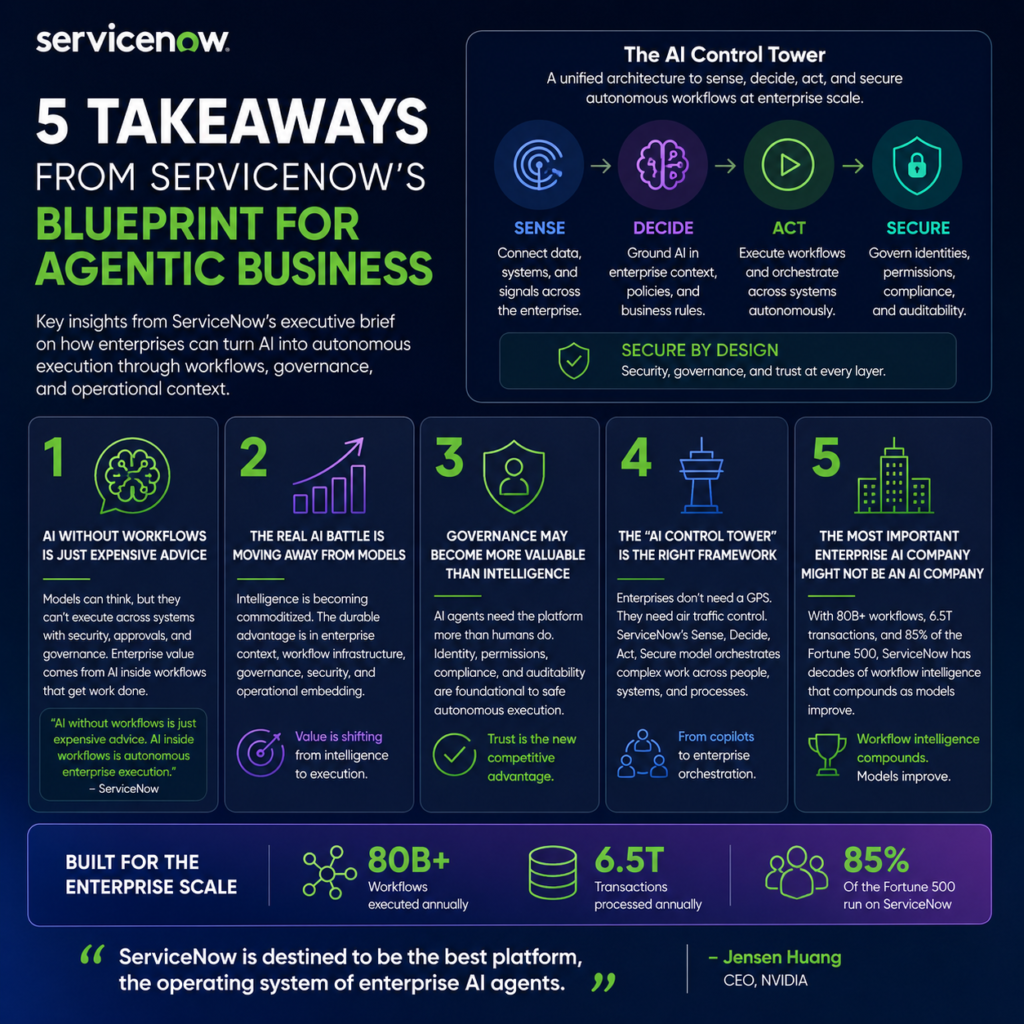
  • 5 Takeaways from ServiceNow’s “Blueprint for Agentic Business”

    Artificial intelligence is quickly moving from chatbot novelty to enterprise infrastructure.

    But one of the biggest insights from ServiceNow’s new executive brief is this:

    AI is not the product anymore.

    Execution is.

    ServiceNow’s “Blueprint for Agentic Business” argues that the future winners in enterprise AI will not simply have the smartest models — they’ll have the best systems for governing, orchestrating, securing, and operationalizing AI across real enterprise workflows.

    Here are my five biggest takeaways.


    1. AI Without Workflows Is Just “Expensive Advice”

    This was probably the strongest line in the document:

    “AI without workflows is just expensive advice. AI inside workflows is autonomous enterprise execution.”

    That’s the real shift happening right now.

    Most AI tools today are impressive at:

    • reasoning
    • summarizing
    • generating content
    • coding
    • answering questions

    But enterprises don’t simply need answers.

    They need:

    • approvals
    • audit trails
    • identity management
    • governance
    • cross-system execution
    • compliance
    • orchestration

    An AI model can explain how a payroll issue happened.

    But can it:

    • securely access the right systems,
    • validate entitlements,
    • trigger approvals,
    • coordinate across HR/payroll/finance,
    • and create an auditable compliance trail?

    That’s the difference between:

    • intelligence
      vs.
    • operational execution.

    And ServiceNow is positioning itself as the operating layer for that execution.


    2. The Real AI Battle Is Moving Away from Models

    One of the smartest observations in the brief:

    AI models are rapidly becoming commoditized.

    The competitive advantage is shifting toward:

    • enterprise context,
    • workflow infrastructure,
    • governance,
    • security,
    • and operational embedding.

    That’s an important mental model.

    The industry conversation often revolves around:

    • benchmark scores,
    • context windows,
    • parameter counts,
    • and which model is “best.”

    But ServiceNow argues the long-term moat is not raw intelligence.

    It’s:

    • where the AI lives,
    • what systems it can access,
    • and whether it can safely execute work.

    That feels directionally correct.

    Because enterprises don’t buy “cool AI.”

    They buy:

    • reduced friction,
    • lower labor costs,
    • faster resolutions,
    • lower compliance risk,
    • and operational leverage.

    3. Governance May Become More Valuable Than Intelligence

    This section stood out:

    “AI agents need the platform more than humans do.”

    That’s a profound insight.

    Humans naturally understand:

    • organizational boundaries,
    • sensitive information,
    • approval structures,
    • and social context.

    AI agents do not.

    The more powerful AI becomes, the more dangerous ungoverned execution becomes.

    That means:

    • identity resolution,
    • permissions,
    • auditability,
    • entitlement management,
    • and workflow controls

    become foundational infrastructure.

    This is where ServiceNow believes it has an advantage:

    • 20+ years of workflow history,
    • enterprise integrations,
    • security architecture,
    • and embedded operational context.

    In other words:

    The future AI winner may not be the company with the smartest model.

    It may be the company enterprises trust to safely operationalize the models.


    4. “AI Control Tower” Is a Powerful Framing Device

    ServiceNow repeatedly uses the phrase:

    “AI Control Tower.”

    And honestly, it’s effective positioning.

    The document compares:

    • a GPS
      vs.
    • air traffic control.

    A GPS helps an individual.

    Air traffic control coordinates an entire system.

    That’s the distinction ServiceNow is trying to create:

    • not AI assistants,
    • but enterprise orchestration.

    The framework breaks into four layers:

    Sense

    Connect enterprise data and systems.

    Decide

    Ground AI in enterprise policies and context.

    Act

    Execute workflows autonomously.

    Secure

    Govern identities, permissions, compliance, and auditability.

    That architecture is probably the clearest articulation I’ve seen yet of how enterprise AI actually becomes operational at scale.


    5. The Most Important Enterprise AI Company Might Not Be an AI Company

    This may be the biggest strategic takeaway.

    ServiceNow is effectively arguing:

    • the model layer commoditizes,
    • but workflow orchestration compounds.

    That’s a fascinating thesis.

    The company cites:

    • 80B+ workflows annually,
    • 6.5T transactions,
    • and deployment inside 85% of the Fortune 500.

    That creates something difficult to replicate:

    • institutional workflow intelligence,
    • embedded governance,
    • operational history,
    • and enterprise relationships.

    And importantly:
    ServiceNow doesn’t need to “win” the foundation model race.

    It benefits as models improve.

    That’s a strong strategic position if the market evolves the way they expect.


    Final Thought

    The most interesting thing about this document is that it reframes enterprise AI away from:

    • chatbots,
    • copilots,
    • and model comparisons

    and toward:

    • operational systems,
    • workflow execution,
    • governance,
    • and enterprise trust.

    That feels much closer to where real enterprise value creation will happen.

    The winners in AI may not simply be the companies with the smartest intelligence.

    They may be the companies that can safely turn intelligence into action.

    Source: ServiceNow, Blueprint for Agentic Business – The Executive Brief