Author: Admin

  • Sales Forecast Accuracy: How to Use KPIs, Pipeline Data, and Deal Signals to Build a More Predictable Revenue System

    Sales forecasting is often treated like a math problem.

    It is not.

    Most forecast problems begin long before a number ever reaches a spreadsheet or CRM dashboard. Forecast accuracy is ultimately a systems problem involving sales behavior, stage discipline, data quality, management pressure, and operational visibility.

    In many organizations, the issue is not a lack of reporting. It is an overload of disconnected metrics that fail to reflect actual buyer behavior.

    A predictable revenue system requires more than quarterly optimism and pipeline reviews. It requires disciplined definitions, connected data, and a shared understanding of what real deal progression actually looks like.
    Sales forecast accuracy

    Why Forecast Accuracy Breaks Down

    Most forecast misses do not happen because finance teams cannot calculate revenue correctly.

    They happen because the underlying sales data was flawed from the beginning.

    Common causes include:

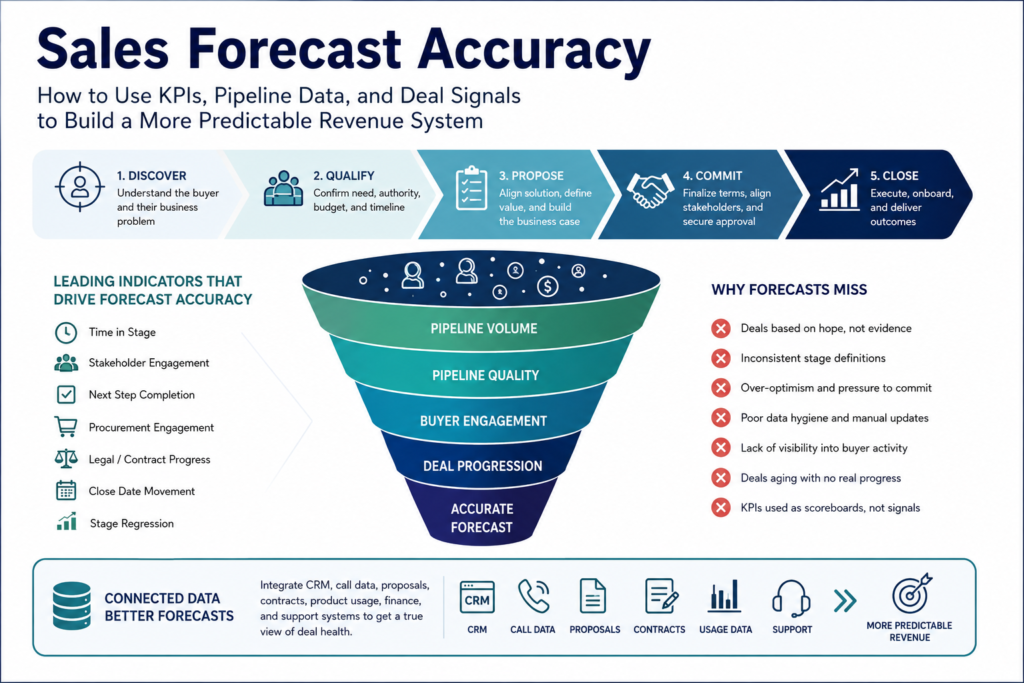
    • Reps forecasting based on hope instead of evidence
    • Undefined or inconsistent stage criteria
    • Pressure to inflate commit numbers
    • CRM hygiene problems
    • Lack of visibility into buyer-side activity
    • Deals remaining open long after momentum has died
    • Leadership rewarding optimism instead of accuracy

    In many companies, the CRM becomes less of a source of truth and more of a political document.

    The result is predictable:

    • Pipeline inflation
    • Missed forecasts
    • Resource misallocation
    • Hiring mistakes
    • Unrealistic board expectations
    • Operational chaos

    Forecasting improves when organizations stop treating it as a spreadsheet exercise and start treating it as a revenue operating system.

    KPIs Are Leading Indicators, Not Scoreboards

    One of the biggest mistakes in sales leadership is using KPIs as historical scoreboards instead of operational indicators.

    Revenue is a lagging indicator.

    By the time revenue declines, the real problems likely began months earlier.

    Strong revenue organizations monitor leading indicators that reveal whether pipeline quality and buyer engagement are improving or deteriorating before quarter-end pressure arrives.

    Examples of valuable leading indicators include:

    • Time in stage
    • Multi-threading across stakeholders
    • Next-step completion rates
    • Proposal turnaround time
    • Procurement engagement
    • Legal review initiation
    • Meeting frequency
    • Opportunity aging
    • Close date movement
    • Stage regression frequency

    These signals matter because they reflect buyer movement, not seller confidence.

    A healthy forecasting culture focuses less on “What number are we calling?” and more on “What evidence supports the number?”

    Forecasting Is a Behavior Problem, Not a Math Problem

    Most forecasting failures are behavioral before they are analytical.

    Sales teams are often incentivized to present confidence rather than accuracy.

    That creates predictable distortions:

    • Sandbagging
    • Artificial pipeline inflation
    • End-of-quarter optimism
    • Deals sitting in commit without buyer movement
    • Managers overriding reality to protect expectations

    Forecasting systems become unreliable when organizations reward enthusiasm over evidence.

    For example, a rep may believe a deal is highly likely because the relationship feels strong. But if procurement has not engaged, legal has not reviewed terms, and no implementation planning has begun, the opportunity may still be immature.

    The problem is not intent. The problem is confusing seller emotion with operational reality.

    Predictable revenue systems reduce ambiguity by defining what progression actually means.

    Why Deals Stall in Commit

    Many organizations treat the commit stage as a confidence bucket.

    That is dangerous.

    A deal should not enter commit because a seller “feels good” about it. It should enter commit because objective signals indicate meaningful buyer-side progression.

    When commit discipline weakens, several things happen:

    • Forecast volatility increases
    • Leadership loses confidence in CRM data
    • Pipeline reviews become emotional debates
    • Quarter-end surprises become normal

    Common warning signs of unhealthy commit-stage deals include:

    • No scheduled next step
    • Repeated close date movement
    • Single-threaded relationships
    • No procurement engagement
    • Undefined implementation timelines
    • No legal activity
    • Low executive involvement
    • Large periods of inactivity

    One of the most valuable exercises for revenue leaders is analyzing historical commit-stage slippage.

    Patterns usually emerge quickly.

    For example:

    • Deals over a certain age may rarely close
    • Single-threaded enterprise opportunities may consistently slip
    • Opportunities without procurement engagement may have low conversion rates
    • Certain industries may experience longer legal cycles

    This is where forecasting evolves from opinion into operational intelligence.

    When a Deal Is Real Enough to Forecast

    Forecast inclusion should be evidence-based.

    A deal is not forecastable simply because it exists in the CRM.

    A healthier approach is defining objective qualification standards for forecast inclusion.

    A forecastable opportunity often includes:

    Confirmed Business Problem

    The buyer has clearly articulated a real operational, financial, or strategic issue.

    Identified Decision Process

    The organization understands how purchasing decisions are made and who is involved.

    Economic Buyer Access

    Someone with budget authority or strategic influence is engaged.

    Defined Timeline

    There is a credible business reason for action within a specific timeframe.

    Mutual Action Plan

    Both sides understand the next steps required to move forward.

    Procurement or Legal Engagement

    Operational buying processes have started.

    Implementation Awareness

    The customer is thinking beyond evaluation and into deployment or adoption.

    The key principle is simple:

    Forecast confidence should increase when buyer-side evidence increases.

    Avoiding KPI Myopia in High-Value Deals

    Metrics are useful.

    Overreliance on metrics can become dangerous.

    Not every high-value opportunity behaves like a transactional sales motion.

    Enterprise deals often involve:

    • Longer decision cycles
    • Complex procurement processes
    • Executive sponsorship
    • Budget realignment
    • Legal negotiation
    • Cross-functional approval

    A dashboard may flag these opportunities as “stalled” even when strategic progress is occurring behind the scenes.

    This is where experienced sales leadership matters.

    Revenue systems should support judgment, not replace it.

    KPI myopia occurs when organizations optimize for metric appearance instead of revenue quality.

    Examples include:

    • Prioritizing activity volume over strategic conversations
    • Overemphasizing call counts
    • Penalizing legitimate deal-cycle complexity
    • Forcing unrealistic close dates for reporting optics
    • Treating every opportunity equally regardless of strategic value

    Strong forecasting systems combine quantitative signals with operational context.

    The Pipeline Signals Revenue Leaders Should Monitor

    Forecasting improves dramatically when organizations focus on pipeline health signals instead of isolated revenue targets.

    Important operational signals include:

    SignalWhy It Matters
    Opportunity agingOlder deals often have lower conversion probability
    Stage regressionDeals moving backward indicate instability
    Close date movementRepeated pushes reduce forecast confidence
    Stakeholder engagementMulti-threaded deals are generally healthier
    Procurement involvementIndicates operational buying momentum
    Legal activityOften signals late-stage seriousness
    Next-step completionReveals execution discipline
    Forecast change historyShows consistency and predictability
    Pipeline source qualitySome channels produce healthier opportunities
    Time-to-proposalOperational efficiency impacts conversion

    Over time, these signals create a more realistic view of revenue predictability than simple pipeline totals alone.

    Why Connected Data Matters in Forecasting

    Forecasting becomes difficult when critical operational data is fragmented across disconnected systems.

    Many organizations have useful signals trapped inside:

    • CRM platforms
    • ERP systems
    • Contract systems
    • Proposal tools
    • Call recording platforms
    • Customer success platforms
    • Marketing automation systems
    • Finance systems
    • Support platforms

    The challenge is not a lack of data.

    The challenge is operational visibility.

    For example:

    • CRM shows a deal is in commit
    • But call activity has declined
    • Legal has not engaged
    • Product usage is low
    • Procurement communication has stopped
    • No implementation resources have been discussed

    Without connected data, leadership sees an incomplete picture.

    This is where modern data engineering and RevOps infrastructure become critical.

    Custom data pipelines can help organizations:

    • Consolidate pipeline signals
    • Improve forecasting visibility
    • Standardize KPI definitions
    • Track buyer progression
    • Identify forecast risk patterns
    • Build more accurate reporting systems
    • Reduce manual forecasting effort
    • Improve executive decision-making

    Better forecasting is not simply about better dashboards.

    It is about creating a cleaner operational system underneath the dashboard.

    Final Thoughts

    Sales forecasting will never be perfect.

    But it can become dramatically more reliable when organizations stop treating forecasting as a quarterly ritual and start treating it as a connected operational discipline.

    Predictable revenue systems are built through:

    • Clear stage definitions
    • Strong CRM hygiene
    • Behavioral accountability
    • Evidence-based forecasting
    • Connected operational data
    • KPI discipline
    • Leadership consistency

    The best forecasting organizations are not necessarily the most optimistic.

    They are the most operationally honest.
  • AI Call Recording Governance: A Framework for Sales Leaders

    AI call recording can be one of the most useful tools in a modern sales organization. It can help managers coach better, help reps improve faster, improve CRM notes, capture customer objections, and give leaders more visibility into what is actually happening in sales conversations.

    But the tool creates a problem.

    Once sales calls are recorded, transcribed, summarized, scored, stored, and shared, the organization is no longer just managing conversations. It is managing sensitive customer data, employee trust, consent practices, access rights, retention rules, and coaching culture.

    That is why sales leaders need governance.

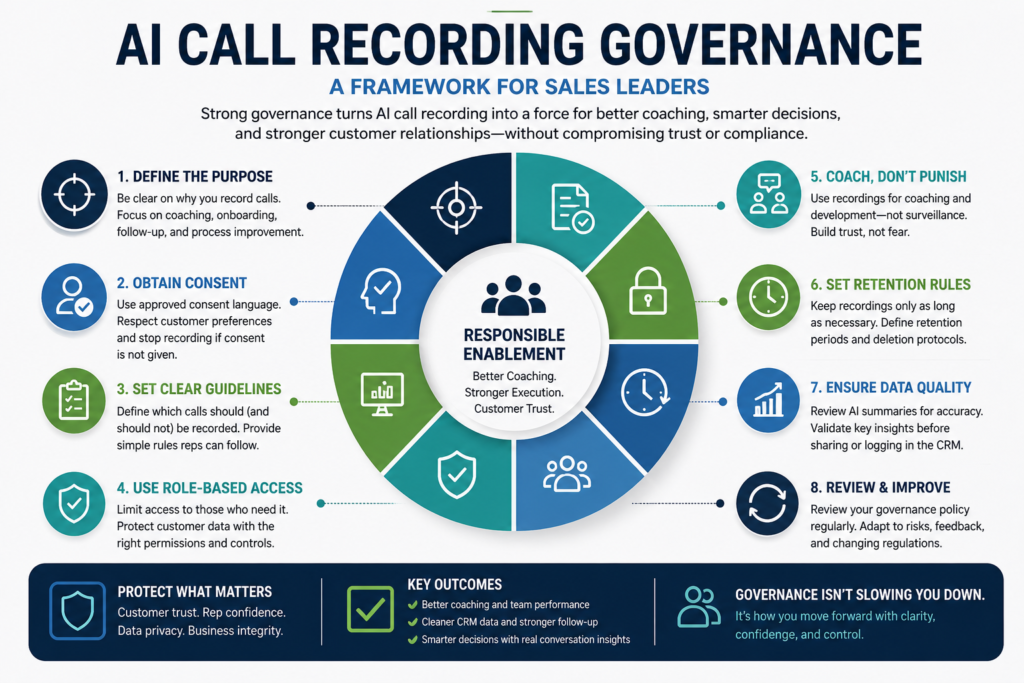
    AI call recording governance is the operating framework that defines how recorded sales conversations should be captured, stored, accessed, reviewed, and used.

    Without governance, AI call recording can quickly become messy. Reps may feel watched. Customers may become guarded. Managers may misuse summaries. Sensitive information may be stored too long. Leadership may start treating AI-generated insights as perfect truth.

    With governance, the tool becomes much more valuable.

    It becomes a system for better coaching, cleaner follow-up, stronger sales execution, and more responsible use of customer conversation data.

    What Is AI Call Recording Governance?

    AI call recording governance is the set of rules, policies, workflows, and expectations that guide how a sales team uses recorded calls and AI-generated call data.

    A governance framework should answer questions like:

    • When should calls be recorded?
    • When should calls not be recorded?
    • How should reps ask for consent?
    • What happens if a customer says no?
    • Who can access recordings and transcripts?
    • How long should recordings be stored?
    • Can managers use recordings in performance reviews?
    • Can AI summaries be copied into the CRM?
    • Who reviews the accuracy of AI-generated notes?
    • What data should never be stored?
    • How often should the policy be reviewed?

    In plain English, governance tells the organization:

    This is how we use AI call recording responsibly.

    Why Sales Leaders Need a Governance Framework

    Many companies roll out AI call recording like it is just another sales productivity feature.

    That is a mistake.

    AI call recording affects the daily behavior of reps, managers, customers, sales operations, legal teams, and executives.

    A sales call may include pricing, procurement concerns, internal politics, competitive information, security requirements, legal issues, budget constraints, or personal details. Once that call is recorded and transcribed, the company has created a data asset — and a risk.

    Governance matters because it protects four things:

    1. Customer trust
    2. Rep trust
    3. Data quality
    4. Organizational judgment

    The goal is not to slow the business down. The goal is to make sure the business uses the tool with clarity.

    1. Define the Purpose of AI Call Recording

    The first governance question is simple:

    Why are we recording calls?

    Sales leaders need to define the purpose before the tool becomes part of daily operations.

    Common purposes include:

    • Sales coaching
    • New rep onboarding
    • CRM note support
    • Customer follow-up
    • Forecast inspection
    • Deal risk review
    • Product feedback
    • Competitive intelligence
    • Customer success handoffs
    • Compliance documentation

    The problem is when companies say the purpose is coaching but then quietly use recordings as a punishment tool.

    That destroys trust.

    If the purpose is coaching, say that clearly. If recordings may be used for compliance or performance review, say that too. Reps deserve to know how the data can be used.

    A good purpose statement might look like this:

    Our sales team uses AI call recording to improve coaching, strengthen customer follow-up, support CRM accuracy, and identify recurring customer needs. Recordings are intended to support better sales execution, not to create a surveillance culture.

    That kind of statement gives the tool a clear identity.

    2. Define Which Calls Should Be Recorded

    Not every sales conversation needs to be recorded.

    A governance framework should define when recording is standard, optional, or discouraged.

    Calls that may make sense to record

    • Discovery calls
    • Product demos
    • Qualification calls
    • Customer onboarding calls
    • Renewal conversations
    • Implementation handoffs
    • Training calls
    • Customer success check-ins

    These calls often contain useful information for coaching, follow-up, and account management.

    Calls that may require caution

    • Legal discussions
    • Sensitive procurement negotiations
    • HR-related customer conversations
    • Security incident discussions
    • Highly regulated customer conversations
    • Executive escalations
    • Calls where the customer declines recording

    A simple policy is better than a vague one.

    For example:

    Record standard sales and customer-facing calls when consent is provided. Do not record legal discussions, sensitive escalations, or conversations where the customer objects.

    The goal is to make the rule easy for reps to understand in real life.

    3. Create Approved Consent Language

    Consent is one of the most important parts of AI call recording governance.

    Sales reps should not be forced to invent disclosure language on the spot. The company should provide approved language that is simple, respectful, and easy to use.

    Example:

    “Do you mind if I record this call so I can stay focused on the conversation and send accurate notes afterward?”

    Another option:

    “Is it okay if I record this meeting for note-taking purposes? I’ll use it to make sure I capture the details correctly.”

    The language should be clear without sounding robotic.

    Sales leaders should also define what happens if the customer says no.

    The rep should know whether to:

    • Turn off the recording
    • Continue the meeting without recording
    • Take manual notes
    • Remove the AI assistant from the meeting
    • Notify a manager if needed

    A good governance framework removes uncertainty.

    4. Separate Coaching From Performance Management

    This may be the most important cultural rule.

    AI call recording should not blur the line between coaching and formal performance management.

    Coaching use

    Coaching use means recordings are used to help reps improve. Examples include:

    • Reviewing discovery questions
    • Improving objection handling
    • Practicing executive conversations
    • Strengthening demo flow
    • Coaching next-step discipline
    • Studying successful calls
    • Helping new reps ramp faster

    Performance management use

    Performance management use is different. It may involve:

    • Formal performance reviews
    • HR investigations
    • Compliance reviews
    • Disciplinary conversations
    • Documentation of repeated behavior
    • Escalated quality issues

    These two use cases should not be treated the same.

    A strong policy might say:

    Call recordings are primarily used for coaching, onboarding, customer follow-up, and operational improvement. Any use of recordings for formal disciplinary or HR-related purposes requires additional review and approval.

    This protects the coaching culture.

    If every call can become a performance weapon, reps will stop trusting the system.

    5. Create Manager Usage Rules

    Managers are the most important users of AI call recording.

    They can either make the tool valuable or make it toxic.

    A governance framework should clearly define healthy and unhealthy manager behavior.

    Healthy manager uses

    Managers should use recordings to:

    • Prepare better coaching sessions
    • Identify team-wide skill gaps
    • Highlight strong examples
    • Help reps improve follow-up
    • Review deal risks with context
    • Support onboarding
    • Improve messaging consistency
    • Find recurring objections

    Unhealthy manager uses

    Managers should avoid:

    • Randomly hunting for mistakes
    • Reviewing calls without context
    • Using AI summaries as final truth
    • Publicly embarrassing reps with clips
    • Overreacting to one bad call
    • Comparing reps without considering account complexity
    • Using talk ratios or sentiment scores as absolute judgments

    AI-generated data should support management judgment. It should not replace it.

    A good manager listens for context. A bad manager cherry-picks clips.

    6. Use Role-Based Access Controls

    Not everyone needs access to every recording.

    Access should be based on role, purpose, and business need.

    A simple access model may look like this:

    Reps

    Reps can access their own calls, summaries, transcripts, and action items.

    Front-line managers

    Managers can access calls for reps on their team.

    Sales leadership

    Sales leaders can access selected calls for coaching, forecasting, enablement, and strategic review.

    Sales enablement

    Enablement can access approved calls for training libraries and onboarding.

    Product and marketing

    Product and marketing may access approved clips, themes, or tagged insights, but not necessarily full call libraries.

    HR and legal

    HR and legal access should be limited to specific approved situations.

    The mistake is giving broad access to everyone.

    That creates risk and damages trust.

    7. Set Retention Rules

    Recorded calls should not be kept forever by default.

    A retention policy defines how long recordings, transcripts, summaries, and AI-generated notes are stored.

    Common retention options include:

    • 90 days
    • 180 days
    • 365 days
    • Longer for selected training calls or compliance needs

    The right retention period depends on the company, industry, customer expectations, and legal requirements.

    But the key is to have a rule.

    The policy should answer:

    • How long are recordings kept?
    • Are transcripts kept for the same period?
    • Are AI summaries stored separately?
    • Who can delete recordings?
    • Are certain calls exempt from deletion?
    • What happens when a customer requests deletion?
    • How is retention handled when a deal closes or is lost?

    Keeping everything forever may feel safe, but it can create unnecessary risk.

    Good governance balances usefulness with restraint.

    8. Create a Call Tagging System

    If every call is recorded but nothing is organized, the library becomes useless.

    Sales leaders should create a simple taxonomy for tagging calls.

    Useful tags may include:

    • Discovery
    • Demo
    • Pricing
    • Renewal
    • Churn risk
    • Competitor mention
    • Budget objection
    • Security concern
    • Legal concern
    • Procurement
    • Executive sponsor
    • Product gap
    • Implementation risk
    • Strong coaching example
    • Training library candidate

    The purpose of tagging is to turn recordings into a searchable knowledge system.

    Instead of having thousands of calls, the organization can find useful moments.

    For example:

    • Best pricing objection examples
    • Calls where a competitor was mentioned
    • Calls with implementation concerns
    • Calls that show strong discovery
    • Calls that reveal product gaps

    This is where AI call recording becomes operational intelligence.

    9. Require Human Review of AI Summaries

    AI-generated summaries are helpful, but they should not be trusted blindly.

    A governance framework should require human review before summaries are used in high-impact workflows.

    For example, reps should review summaries before:

    • Sending follow-up emails
    • Updating CRM opportunity notes
    • Sharing recaps with customers
    • Escalating deal risk
    • Creating handoff notes for customer success
    • Summarizing commitments made during the call

    The rule should be simple:

    AI can draft the summary. The human owns the accuracy.

    This matters because AI can miss tone, nuance, hesitation, sarcasm, uncertainty, or relationship context.

    A customer who says, “That might work if procurement is comfortable,” has not fully committed.

    AI summaries can flatten that nuance.

    10. Protect Sensitive Customer Information

    Sales conversations often include sensitive customer information.

    A governance policy should define what kind of information should not be stored, copied, or widely shared.

    Examples may include:

    • Passwords
    • Private personal information
    • Legal strategy
    • Security vulnerabilities
    • Confidential financial details
    • Internal customer personnel issues
    • Unapproved competitive information
    • Highly sensitive procurement discussions

    Reps should be trained to recognize when a conversation becomes sensitive.

    Managers should know when to stop recording or restrict access.

    Sales leaders should also understand how vendors store, process, and protect recorded call data.

    Vendor risk matters because the conversation data does not live only in the sales team’s head anymore. It may live inside a third-party platform.

    11. Train Reps Before Rollout

    A common mistake is turning on AI call recording and assuming reps will figure it out.

    They need training.

    Training should cover:

    • Why the company is using AI call recording
    • How recordings will be used
    • How recordings will not be used
    • How to ask for consent
    • What to do if a customer declines
    • How to review summaries
    • How to correct CRM notes
    • How to use recordings for self-coaching
    • What sensitive information to avoid storing
    • Who to contact with concerns

    The rollout should feel like a professional enablement program, not a surprise monitoring system.

    The tone matters.

    Sales leaders should present AI call recording as a way to help the team get better, not as a way to catch people doing something wrong.

    12. Train Managers Separately

    Managers need their own training because they control the culture of the tool.

    Manager training should cover:

    • How to coach from recordings
    • How to avoid “gotcha” reviews
    • How to use AI summaries responsibly
    • How to discuss calls with reps
    • How to identify team-wide patterns
    • How to separate coaching from performance management
    • How to select good training examples
    • How to avoid over-reliance on AI scores

    A manager who misuses call recordings can destroy trust quickly.

    A manager who uses them well can accelerate learning across the entire team.

    13. Review the Governance Policy Regularly

    AI tools change quickly. Sales processes change. Legal requirements can change. Customer expectations can change.

    Governance should not be set once and forgotten.

    A practical review schedule:

    • 30 days after rollout
    • 90 days after rollout
    • Every six months after that

    During review, sales leaders should ask:

    • Are reps comfortable with the tool?
    • Are customers objecting to recording?
    • Are managers using recordings appropriately?
    • Are summaries accurate enough?
    • Are CRM notes improving?
    • Are recordings being retained too long?
    • Are access controls working?
    • Are there any sensitive data concerns?
    • Are we getting real coaching value?

    The goal is continuous improvement.

    Example AI Call Recording Governance Policy

    Here is a simple starting framework sales leaders can adapt.

    Purpose

    AI call recording is used to support coaching, onboarding, customer follow-up, CRM accuracy, and sales process improvement.

    Consent

    Reps must disclose recording and receive consent when required. If a customer declines, the recording must be stopped and the meeting may continue without recording.

    Recording standards

    Standard discovery, demo, renewal, onboarding, and customer success calls may be recorded. Sensitive legal, HR, security, or escalation conversations should not be recorded without approval.

    Access

    Reps may access their own calls. Managers may access their team’s calls. Broader access requires a defined business purpose.

    Coaching

    Recordings should primarily be used for coaching and development. Managers should review calls with context and avoid using isolated clips punitively.

    Performance use

    Use of recordings for formal performance management, HR, disciplinary, or investigative purposes requires additional approval.

    Retention

    Recordings and transcripts should be retained only for the approved retention period unless specifically preserved for training, legal, or compliance reasons.

    AI summaries

    AI summaries must be reviewed by a human before being sent externally, entered into CRM as official notes, or used for management decisions.

    Sensitive information

    Reps and managers should avoid storing, sharing, or widely distributing sensitive customer information captured in recordings.

    Review

    The policy should be reviewed regularly by sales leadership, sales operations, legal, and enablement.

    Common Mistakes to Avoid

    Mistake 1: No Written Policy

    If the rules are not written down, they are not real.

    A verbal understanding is not enough.

    Mistake 2: Letting Every Manager Use the Tool Differently

    Inconsistent manager behavior creates distrust.

    The team needs common standards.

    Mistake 3: Treating AI Scores as Truth

    Talk ratios, sentiment scores, and AI-generated insights can be useful signals. They are not complete judgments.

    Mistake 4: Ignoring Customer Comfort

    Just because the software can record does not mean every customer will be comfortable.

    Respect matters.

    Mistake 5: Keeping Too Much Data

    Retaining every recording forever can create clutter and risk.

    Mistake 6: Using Recordings Only When Something Goes Wrong

    If recordings are only reviewed after a problem, reps will associate the tool with punishment.

    Use recordings for positive coaching too.

    Mistake 7: Failing to Explain the Why

    Reps are more likely to accept AI call recording when they understand the purpose, limits, and benefits.

    The Bottom Line

    AI call recording can help sales teams become sharper, faster, and more consistent.

    But the tool needs rules.

    Without governance, AI call recording can damage trust, create compliance issues, overwhelm managers with data, and turn coaching into surveillance.

    With governance, it can improve coaching, strengthen follow-up, protect customer information, and help leaders understand what is really happening in the sales process.

    The best sales organizations will not be the ones that record the most calls.

    They will be the ones that use recorded conversations with the most judgment.

    AI call recording governance is not bureaucracy.

    It is how sales leaders make the technology useful, ethical, and sustainable.

  • What Is Recovery Point Objective? RPO Explained for Business Owners

    Recovery Point Objective, usually called RPO, is the amount of data a business can afford to lose after a disruption.

    It answers a simple question:

    If something goes wrong, how far back can we safely restore?

    For example, if your company backs up its systems once every 24 hours, you may lose up to a full day of work if disaster strikes right before the next backup runs.

    That means your RPO may be 24 hours.

    If your business backs up every hour, your potential data loss may be closer to one hour.

    That means your RPO may be one hour.

    In plain English:

    RPO is your acceptable data loss window.

    Why RPO Matters

    A business does not just need backups. It needs backups that match the business risk.

    Some data can be restored from yesterday without much damage. Other data may be so important that losing even 15 minutes creates a serious problem.

    Think about the difference between:

    • A blog archive
    • A law firm case file
    • A hospital patient record
    • A customer order database
    • A financial trading system
    • A payroll system
    • A manufacturing control system

    Each one has a different tolerance for data loss.

    That is why RPO matters. It forces the business to define what level of data loss is acceptable.

    RPO Examples

    Here are simple examples:

    Business SystemPossible RPOWhat It Means
    Public website content24 hoursLosing one day of updates may be acceptable
    Internal file storage12 hoursLosing half a day of files may be painful but manageable
    Accounting system4 hoursLosing a full day of entries may create major cleanup
    CRM system1 hourLosing sales activity and customer updates matters
    E-commerce orders15 minutesLosing recent orders could affect revenue and customers
    Hospital recordsNear-zeroLosing patient data could be unacceptable

    The right RPO depends on the business, the system, and the consequences of data loss.

    RPO and Backup Frequency

    RPO is closely connected to backup frequency.

    If you need an RPO of one hour, backing up once per day is not enough.

    If you need an RPO of 15 minutes, then daily backups are nowhere close.

    This is where many businesses get into trouble. They assume they “have backups,” but they never ask whether the backup schedule matches the business need.

    A company may have backups, but still have the wrong RPO.

    RPO and Ransomware

    RPO becomes especially important during a ransomware event.

    If ransomware encrypts live systems and spreads into connected backups, the business may need to restore from an older clean copy.

    That creates two questions:

    1. How recent is the clean backup?
    2. How much data would be lost if we restore from it?

    That is an RPO question.

    A business may discover that its latest usable backup is three days old. That means it could lose three days of work.

    For some companies, that is annoying.

    For others, it is devastating.

    RPO Is a Business Decision, Not Just an IT Decision

    IT can recommend backup tools, schedules, and recovery options. But the business needs to decide what data loss is acceptable.

    That means RPO should involve:

    • Business leadership
    • IT
    • Legal
    • Finance
    • Operations
    • Compliance
    • Department owners

    The sales team may know what customer data cannot be lost.

    The finance team may know what accounting records matter most.

    The legal team may know what records must be preserved.

    The operations team may know what systems keep the business running.

    RPO is where technology and business risk meet.

    Questions to Ask About RPO

    A business should ask:

    • What systems are most important?
    • How much data could we lose without serious damage?
    • How often are backups running?
    • Are backups protected from ransomware?
    • Are backup copies stored offline or offsite?
    • How old is our last clean recovery copy?
    • Have we tested restoration from backup?
    • Do different systems need different RPOs?

    The answer will not be the same for every system.

    Bottom Line

    Recovery Point Objective is one of the most important concepts in backup and disaster recovery planning.

    It tells a business how much data it can afford to lose.

    The lower the RPO, the more frequently the business needs to protect its data.

    The lesson is simple:

    Backup is not the goal. Recoverable data is the goal.


  • AI Call Recording in Sales: Benefits, Risks, Compliance, and Governance

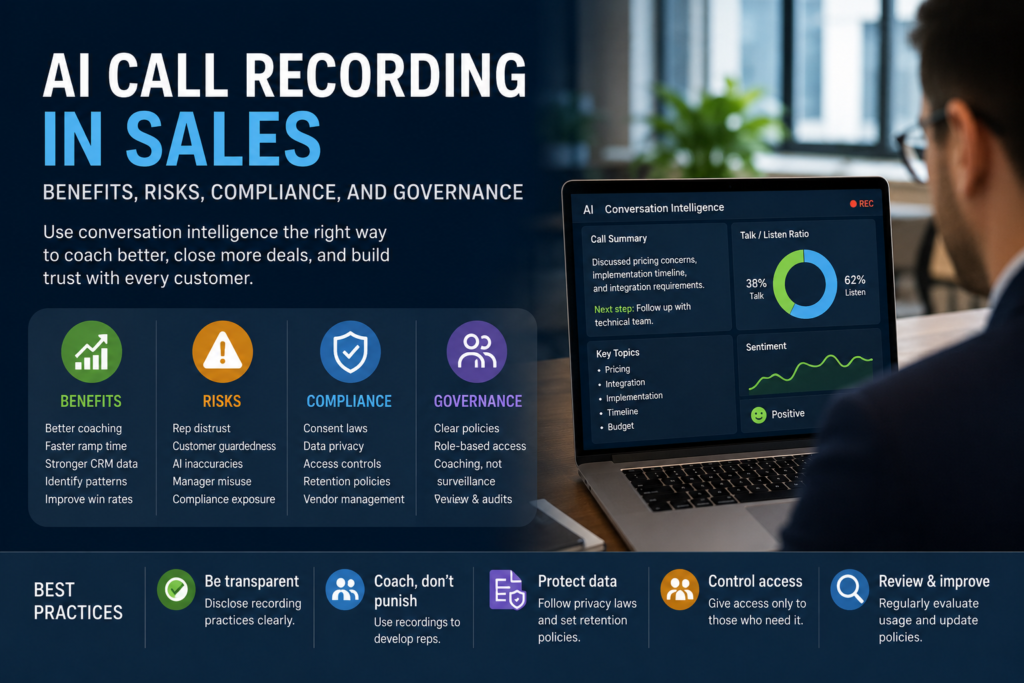
    AI call recording is becoming a standard part of the modern sales stack. Tools like Gong, Clari Copilot, Zoom AI Companion, Microsoft Teams, and other conversation intelligence platforms can record sales calls, create transcripts, summarize meetings, identify objections, and help managers coach reps more consistently.

    That sounds simple.

    Record the call. Summarize the conversation. Update the CRM. Improve coaching. Move faster.

    But AI call recording is not just a productivity tool. It changes how sales teams communicate, how managers coach, how customer information is stored, and how organizations handle privacy, consent, and trust.

    Used well, AI call recording can make a sales team smarter, more consistent, and more prepared. Used poorly, it can create surveillance anxiety, compliance risk, bad data, and a weaker sales culture.

    This guide explains the benefits, risks, compliance issues, and governance practices sales leaders should understand before rolling out AI call recording across a team.

    AI Call Recordings

    What Is AI Call Recording?

    AI call recording refers to software that records sales conversations and uses artificial intelligence to analyze them.

    A typical AI call recording platform may provide:

    • Meeting recordings
    • Call transcripts
    • AI-generated summaries
    • Action items
    • CRM notes
    • Objection tracking
    • Competitor mentions
    • Talk-to-listen ratios
    • Sentiment indicators
    • Coaching recommendations
    • Deal risk signals

    In plain English, AI call recording turns sales conversations into searchable data.

    That is the opportunity.

    Instead of relying only on a rep’s memory, handwritten notes, or a manager randomly joining calls, the organization gets a record of what was said, what was promised, what objections came up, and what needs to happen next.

    But that same power creates responsibility. Recorded conversations often contain customer problems, pricing discussions, internal politics, personal details, negotiation strategy, and sensitive business information.

    That is why AI call recording needs to be treated as both a sales enablement tool and a governance issue.

    Why Sales Teams Use AI Call Recording

    Sales teams use AI call recording because sales conversations contain valuable information that is easy to lose.

    A discovery call may reveal the real business pain. A demo may expose confusion about the product. A pricing conversation may show hesitation from the buyer. A renewal call may surface risk months before a customer churns.

    Without recording, much of that information disappears.

    AI call recording helps sales teams capture and reuse that knowledge.

    The Main Benefits of AI Call Recording

    Better Sales Coaching

    One of the biggest benefits is coaching.

    Before AI call recording, managers often had limited visibility into actual sales conversations. They might join a few calls, review CRM notes, or rely on the rep’s version of what happened.

    AI call recording gives managers more direct evidence.

    They can review real calls, identify patterns, and coach based on actual behavior rather than vague impressions.

    For example, a manager may discover that a rep:

    • Talks too much during discovery
    • Skips business impact questions
    • Fails to confirm next steps
    • Handles pricing objections too defensively
    • Does not ask enough follow-up questions

    That kind of coaching can be specific and useful.

    Instead of saying, “You need to improve discovery,” the manager can say, “At minute 14, the customer mentioned budget pressure. That was a chance to ask how the project is being funded.”

    That is much better coaching.

    Faster Ramp Time for New Reps

    AI call recording can also help new sales reps ramp faster.

    New reps can study real examples of:

    • Strong discovery calls
    • Effective demos
    • Pricing conversations
    • Objection handling
    • Competitive positioning
    • Executive-level conversations
    • Renewal risk discussions

    This gives new hires a library of real sales situations instead of only training decks and role plays.

    The best training is often watching how strong performers handle real conversations.

    Better Follow-Up

    AI-generated summaries can help reps write better follow-up emails and update CRM records more quickly.

    After a call, AI can often produce:

    • Meeting recap
    • Key pain points
    • Customer goals
    • Action items
    • Decision criteria
    • Next steps
    • Open questions

    This can save time and reduce sloppy follow-up.

    But there is a catch: AI summaries should not be treated as final truth. They should be reviewed by the rep before being sent to a customer or entered into the CRM.

    The AI can help. The human still owns the message.

    Stronger CRM Hygiene

    Sales organizations often struggle with CRM quality.

    Reps forget details. Notes are inconsistent. Opportunities are updated late. Managers get incomplete information.

    AI call recording can improve CRM hygiene by giving reps a cleaner starting point for updates.

    A good AI summary can help capture:

    • Who attended
    • What was discussed
    • What the customer cares about
    • What objections came up
    • What next step was agreed to
    • What timeline was mentioned

    That improves sales operations, forecasting, and account management.

    Better Visibility Into Customer Patterns

    At scale, AI call recording can help leaders identify patterns across many conversations.

    For example:

    • Which objections come up most often?
    • Which competitors are mentioned most?
    • Where do demos lose momentum?
    • What product gaps are customers raising?
    • What language do buyers use to describe their pain?
    • What risks appear in renewal conversations?

    This is where AI call recording becomes more than a coaching tool. It becomes a source of market intelligence.

    Sales calls are one of the richest data sources inside a company. AI makes that data easier to search and analyze.

    The Main Risks of AI Call Recording

    AI call recording also creates real risks.

    The biggest mistake leaders make is assuming the tool is automatically good because it produces more data.

    More data is not the same thing as better judgment.

    Reps May Feel Watched Instead of Coached

    If AI call recording is rolled out poorly, reps may feel like they are under surveillance.

    That creates fear.

    Instead of thinking, “This will help me improve,” reps may think:

    • “Is my manager looking for mistakes?”
    • “Will one bad call be used against me?”
    • “Am I being scored by an algorithm?”
    • “Is this coaching or monitoring?”

    Once reps feel watched, behavior changes. They may become less natural, less creative, and less willing to take risks in conversations.

    That hurts performance.

    A sales team needs accountability, but it also needs trust. AI call recording should support coaching, not create a culture of gotcha management.

    Customers May Become More Guarded

    Customers may also behave differently when they know a call is being recorded.

    Some buyers will not care. Others will become more cautious.

    They may share less about:

    • Internal politics
    • Budget constraints
    • Competitive evaluations
    • Implementation concerns
    • Decision-maker dynamics
    • Legal or procurement issues

    That matters because the most useful sales information is often sensitive and nuanced.

    A recorded call can sometimes become a more sanitized call.

    Sales leaders need to understand that recording changes the environment. It is not neutral.

    AI Summaries Can Be Wrong

    AI summaries are useful, but they are not perfect.

    They can miss nuance, misstate details, or over-simplify what happened.

    For example, a customer saying:

    “This could be interesting, but we have budget concerns.”

    Might get summarized as:

    “Customer is interested in moving forward.”

    That is dangerous.

    The difference between curiosity and commitment matters.

    If reps, managers, or executives treat AI summaries as perfect, they can make bad decisions with confidence.

    That may be the most dangerous kind of error.

    Managers Can Misuse the Data

    Even well-intentioned managers can misuse call recordings.

    They may:

    • Review calls without context
    • Over-focus on isolated mistakes
    • Use AI scores as performance judgments
    • Compare reps unfairly
    • Turn coaching into criticism
    • Use recordings to confirm existing bias

    A recorded call is evidence, but it is not the whole story.

    A manager still needs judgment.

    Too Much Data Can Create Noise

    Recording every call can create an enormous library of information.

    That sounds valuable, but without structure it becomes noise.

    If the organization has no tagging system, no review process, no retention policy, and no clear ownership, the call library becomes a dumping ground.

    The company has more data, but not more insight.

    Compliance Issues Sales Teams Should Understand

    AI call recording also raises compliance and privacy questions.

    This is not legal advice, but sales leaders should know the basic risk areas and involve legal counsel before rolling out recording tools.

    Consent Rules Matter

    Recording laws can vary by location. Some places require one-party consent. Others require all-party consent.

    That means a sales team operating across states, countries, or regions needs a clear policy for disclosure and consent.

    A casual approach is risky.

    A rep should not be inventing consent language on the fly. The company should provide approved language.

    Example:

    “Before we begin, is it okay if I record this call so I can capture accurate notes and follow up properly?”

    If the customer says no, the rep should know exactly what to do.

    Storage and Retention Matter

    Recorded calls may contain sensitive business information.

    That means companies need to decide:

    • Where recordings are stored
    • Who can access them
    • How long they are kept
    • When they are deleted
    • Whether transcripts follow the same retention rules
    • Whether recordings are connected to CRM records
    • Whether vendors can access the data

    Keeping everything forever is usually not a strategy. It is a liability.

    Access Controls Matter

    Not everyone in the company should have access to every call.

    Access should be role-based.

    For example:

    • Reps can access their own calls
    • Managers can access their team’s calls
    • Sales leadership can access selected calls for coaching and review
    • Product or marketing may get access to approved snippets or tagged themes
    • HR/legal access should require a clear process

    Without access controls, AI call recording can quickly feel invasive.

    Customer Data Matters

    Sales calls can include confidential customer information.

    A customer may discuss:

    • Revenue
    • Budgets
    • Vendor problems
    • Internal decision-making
    • Security concerns
    • Legal issues
    • Strategic priorities

    That information should be handled carefully.

    Sales teams need to remember that a call recording is not just “sales data.” It may also be customer confidential information.

    Governance: The Framework Every Sales Team Needs

    The best sales teams do not just buy AI call recording software. They build a governance model around it.

    Governance does not need to be complicated. It needs to be clear.

    1. Define the Purpose

    Start with the question:

    Why are we recording calls?

    Possible answers include:

    • Coaching
    • Onboarding
    • CRM accuracy
    • Forecast support
    • Customer handoffs
    • Product feedback
    • Compliance documentation
    • Market intelligence

    The purpose matters because it shapes the rules.

    If the stated purpose is coaching, do not quietly use recordings as a punitive performance tool. That destroys trust.

    2. Create a Recording Policy

    The company should define when calls should and should not be recorded.

    For example:

    Record:

    • Discovery calls
    • Demos
    • Implementation handoffs
    • Renewal discussions
    • Customer training calls

    Do not record, or require special approval for:

    • Legal discussions
    • Sensitive negotiations
    • Internal escalations
    • Customer calls where the customer declines
    • Highly regulated conversations

    The policy should be simple enough for reps to follow in real life.

    3. Standardize Consent Language

    Give reps approved consent language.

    Do not make every rep improvise.

    Good consent language should be:

    • Clear
    • Respectful
    • Short
    • Easy to say
    • Easy for the customer to decline

    Example:

    “Do you mind if I record this so I can stay focused on the conversation and send accurate notes afterward?”

    That feels better than a cold legal disclaimer.

    4. Separate Coaching From Performance Management

    This is one of the most important rules.

    Coaching use and performance use are not the same.

    Coaching use means helping reps improve skills.

    Performance use means using recordings for evaluation, discipline, compliance, or HR-related decisions.

    A healthy policy should explain the difference.

    For example:

    Call recordings are primarily used for coaching, onboarding, and customer follow-up. Any use of recordings for formal performance review, investigation, or disciplinary action requires manager and HR approval.

    That kind of clarity reduces fear.

    5. Define Manager Rules

    Managers need rules too.

    They should know what good use looks like and what misuse looks like.

    Healthy manager uses:

    • Reviewing calls with the rep
    • Identifying coaching themes
    • Sharing strong examples
    • Helping reps prepare for follow-up
    • Spotting deal risk
    • Improving team training

    Unhealthy manager uses:

    • Randomly hunting for mistakes
    • Reviewing calls without context
    • Using AI summaries as final truth
    • Comparing reps without considering deal complexity
    • Turning every call into a performance critique

    AI call recording should make managers better coaches, not better surveillance officers.

    6. Set Retention Rules

    Decide how long recordings and transcripts should be kept.

    Common options might include:

    • 90 days
    • 180 days
    • 365 days
    • Longer for selected training calls or regulated needs

    The right answer depends on the business, legal requirements, customer expectations, and risk tolerance.

    But there should be an answer.

    No retention policy usually means the company keeps too much for too long.

    7. Build a Tagging System

    A call library is only useful if people can find what matters.

    Create a simple tagging system.

    Useful tags may include:

    • Discovery
    • Demo
    • Pricing
    • Renewal
    • Churn risk
    • Competitor mention
    • Security concern
    • Legal concern
    • Budget objection
    • Implementation risk
    • Executive sponsor
    • Product feedback

    This turns recordings into a usable knowledge base.

    8. Train Reps

    Do not just turn on the tool and expect reps to figure it out.

    Train them on:

    • Why the company is using AI call recording
    • How to ask for consent
    • What to do if a customer declines
    • How to review AI summaries
    • How to use recordings for self-coaching
    • How recordings will and will not be used by managers
    • What data should not be entered into CRM

    The rollout should feel like enablement, not enforcement.

    9. Review the Policy Regularly

    AI tools change quickly. So do laws, customer expectations, and internal practices.

    Review the policy regularly.

    A good cadence might be:

    • 30 days after rollout
    • 90 days after rollout
    • Every six months after that

    Ask:

    • Are reps using the tool?
    • Do customers object?
    • Are summaries accurate enough?
    • Are managers coaching appropriately?
    • Are recordings being retained too long?
    • Are there access issues?
    • Are we getting real business value?

    Governance should evolve.

    How Sales Leaders Should Think About AI Call Recording

    The wrong question is:

    Should we record sales calls?

    The better question is:

    What operating model do we need to use recorded sales conversations responsibly?

    AI call recording is not just a feature. It changes the sales operating system.

    It affects:

    • Coaching
    • Trust
    • Data quality
    • CRM hygiene
    • Forecasting
    • Customer experience
    • Compliance
    • Management behavior
    • Sales culture

    That is why leadership matters.

    A weak sales culture will use AI call recording poorly. A strong sales culture can use it to get better.

    Common Mistakes to Avoid

    Mistake 1: Rolling It Out Without Explaining Why

    If reps do not understand the purpose, they will assume the worst.

    Explain the business reason. Explain the coaching value. Explain the rules.

    Mistake 2: Treating AI Summaries as Perfect

    AI summaries are drafts, not final records.

    Reps should review and correct them.

    Mistake 3: Ignoring Consent

    Consent should be built into the workflow. Do not leave it to chance.

    Mistake 4: Giving Too Many People Access

    Broad access creates privacy and trust problems.

    Use role-based permissions.

    Mistake 5: Keeping Recordings Forever

    Retention needs a policy.

    Keeping everything forever may create unnecessary risk.

    Mistake 6: Using Recordings to Punish Reps

    If the tool becomes punitive, adoption will suffer.

    Use recordings to coach first.

    Mistake 7: Recording Everything Without a Plan

    More recordings do not automatically create more insight.

    You need tagging, review habits, and clear use cases.

    FAQ: AI Call Recording in Sales

    Is AI call recording good for sales teams?

    Yes, if it is used with clear rules. AI call recording can improve coaching, follow-up, onboarding, and CRM quality. But without governance, it can create trust and compliance problems.

    Should every sales call be recorded?

    Not necessarily. Some calls may be inappropriate to record, especially sensitive legal, procurement, or regulated discussions. Sales teams should define when recording is required, optional, or discouraged.

    Can AI call summaries replace rep notes?

    No. AI summaries can help reps create better notes faster, but the rep should still review and correct the summary. The rep owns the customer relationship and the accuracy of the follow-up.

    What is the biggest risk of AI call recording?

    The biggest risk is misuse. If reps feel watched instead of coached, trust declines. If managers rely too heavily on AI summaries, judgment declines. If companies ignore consent and retention, compliance risk increases.

    What should a good AI call recording policy include?

    A good policy should include purpose, consent language, access rules, retention rules, manager guidelines, coaching expectations, customer opt-out instructions, and review procedures.

    The Bottom Line

    AI call recording can be a powerful tool for modern sales teams.

    It can improve coaching, speed up follow-up, strengthen CRM hygiene, and help leaders understand what is really happening in customer conversations.

    But it also introduces risk.

    Recorded calls contain sensitive information. AI summaries can be wrong. Managers can misuse the data. Reps can feel watched. Customers can become guarded. Compliance rules can get complicated.

    The winning teams will not be the ones that record the most calls.

    The winning teams will be the ones that build the best judgment around how recorded calls are used.

    AI call recording should not replace trust, coaching, or human understanding.

    It should support them.

  • What Is Recovery Time Objective?

    Recovery Time Objective, usually called RTO, is the amount of time a business can afford to be down after a disruption.

    It answers this question:

    How quickly do we need to get this system working again?

    If a company’s website can be down for a day without major damage, its RTO may be 24 hours.

    If a hospital system, payment platform, or manufacturing system needs to be back within minutes, its RTO may be much shorter.

    In plain English:

    RTO is your acceptable downtime window.

    Why RTO Matters

    Every system has a different level of urgency.

    Some systems are important but not immediately urgent. Others need to be restored quickly because the business cannot operate without them.

    For example:

    Business SystemPossible RTOWhat It Means
    Marketing website24–48 hoursAnnoying, but usually not business-ending
    Shared file server8–24 hoursWork slows down, but may continue
    CRM system4–8 hoursSales and customer service may be affected
    E-commerce platform1 hourRevenue may stop while systems are down
    Payment processingMinutesThe business may be unable to transact
    Emergency operations systemNear-immediateDowntime may create safety or legal issues

    RTO helps the business decide which systems need to come back first.

    RTO Is About Prioritization

    During a real incident, not everything can be restored at once.

    The business has to decide:

    • What comes back first?
    • What can wait?
    • Who makes that decision?
    • What systems depend on other systems?
    • What manual workarounds exist?
    • What vendors need to be involved?

    RTO gives structure to those decisions.

    Without RTO, recovery becomes panic.

    With RTO, recovery becomes a plan.

    RTO and Backup Recovery

    A backup is only useful if the business can restore it in time.

    This is where many businesses get surprised.

    They may have backups, but restoring those backups could take much longer than expected.

    For example:

    • The backup may be stored offsite.
    • The tape may need to be retrieved.
    • The cloud restore may take hours.
    • The backup may be large.
    • The recovery environment may not be ready.
    • The business may need vendor support.
    • The network may not have enough bandwidth.
    • The restore process may not have been tested.

    So the question is not just:

    “Do we have a backup?”

    The better question is:

    “Can we restore fast enough for the business?”

    That is an RTO question.

    RTO and Ransomware

    RTO is critical during ransomware recovery.

    If a ransomware attack takes systems offline, leadership will want to know:

    • How long will we be down?
    • Which systems can be restored first?
    • Are backups usable?
    • How long will restoration take?
    • Can we operate manually in the meantime?
    • When can customers, employees, and partners expect service to resume?

    A company that has never defined its RTO may be forced to make those decisions under pressure.

    That is not ideal.

    RTO should be discussed before the crisis.

    RTO Is a Business Decision

    Like RPO, RTO is not just an IT metric.

    It is a business risk decision.

    IT can explain what recovery options exist. But business leaders need to decide what downtime is acceptable.

    A shorter RTO usually costs more because it may require:

    • Better backup tools
    • Faster storage
    • Cloud replication
    • High availability systems
    • Standby environments
    • Disaster recovery infrastructure
    • More testing
    • More operational planning

    Not every system needs the shortest possible RTO.

    That is why classification matters.

    Questions to Ask About RTO

    A business should ask:

    • What systems are mission-critical?
    • How long can each system be down?
    • What is the cost of downtime?
    • Which systems must be restored first?
    • What systems depend on each other?
    • Do we have manual workarounds?
    • Who declares a disaster?
    • Who leads recovery?
    • Have we tested the restore process?
    • Does our current backup plan meet our RTO?

    These questions help move backup planning from vague optimism to practical recovery planning.

    Bottom Line

    Recovery Time Objective is one of the most important concepts in disaster recovery and business continuity.

    It tells a business how long it can afford to be down.

    The shorter the RTO, the faster and more expensive the recovery strategy may need to be.

    The lesson is simple:

    A backup is not enough. The business needs to know how quickly it can recover.